> ## Documentation Index
> Fetch the complete documentation index at: https://docs.talkifai.dev/llms.txt
> Use this file to discover all available pages before exploring further.
# Knowledge Base Integration
> Give your agent access to your documents, FAQs, and company data using RAG (Retrieval Augmented Generation).
## Overview
Knowledge Base integration allows your voice agent to access your company documents, FAQs, product manuals, and other information sources during conversations. Using **RAG (Retrieval Augmented Generation)**, the agent automatically retrieves relevant information and incorporates it into responses.
**Best for:**
* Customer support with product documentation
* Internal helpdesks with company policies
* Technical support with manuals and guides
* Any agent that needs accurate, up-to-date information
***
## How It Works
```
User asks: "What's your return policy?"
│
▼
Agent searches linked Knowledge Bases
│
▼
Retrieves top 5 relevant chunks (similarity > 0.7)
│
▼
Injects context into LLM prompt
│
▼
Agent responds with accurate information from your docs
```
***
## Step 1: Create a Knowledge Base
### Upload Documents
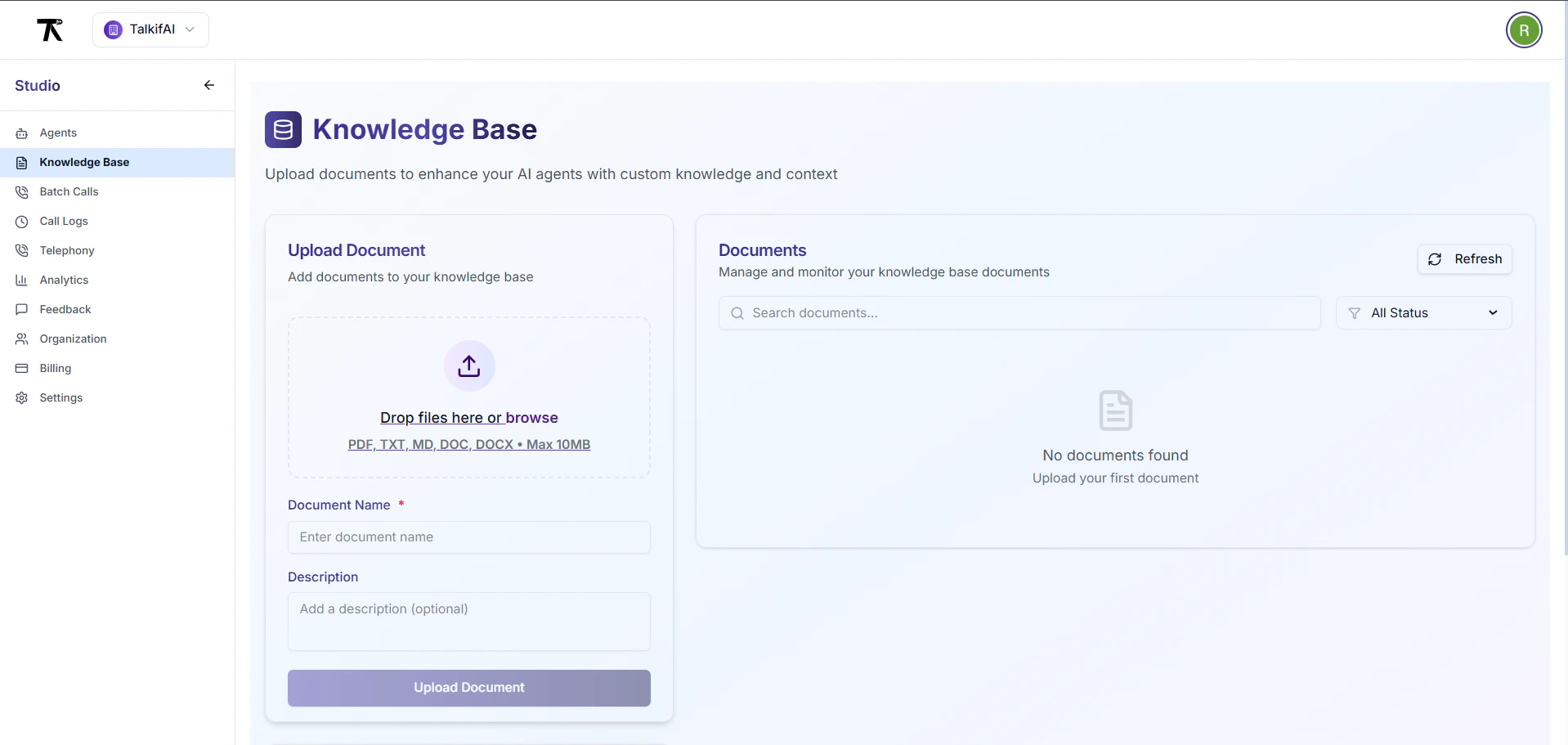 1. Go to **Studio → Knowledge Base → Create New**
2. Fill in the details:
| Field | Description |
| ----------------- | ------------------------------------------------------------ |
| **Name** | Clear identifier (e.g., "Product Documentation 2024") |
| **Description** | What this KB contains |
| **File** | Upload PDF, TXT, DOCX, or MD files |
| **Chunk Size** | How to split documents (default: 1000 characters) |
| **Chunk Overlap** | Overlap between chunks for context (default: 200 characters) |
3. Click **Upload & Process**
**Supported file types:** PDF, TXT, DOCX, MD, CSV
**Max file size:** 50MB per file (actual limit may vary by deployment)
**Processing time:** Typically 1-5 minutes depending on file size and system load
**Chunk defaults:** 1000 characters with 200 character overlap (configurable)
### Document Processing
After upload, your document is automatically:
1. **Chunked** into smaller pieces based on your settings
2. **Embedded** using vector embeddings
3. **Indexed** for fast similarity search
4. **Status** changes from `processing` → `ready`
***
## Step 2: Link Knowledge Base to Agent
### Link via Studio
1. Go to **Studio → Knowledge Base → Create New**
2. Fill in the details:
| Field | Description |
| ----------------- | ------------------------------------------------------------ |
| **Name** | Clear identifier (e.g., "Product Documentation 2024") |
| **Description** | What this KB contains |
| **File** | Upload PDF, TXT, DOCX, or MD files |
| **Chunk Size** | How to split documents (default: 1000 characters) |
| **Chunk Overlap** | Overlap between chunks for context (default: 200 characters) |
3. Click **Upload & Process**
**Supported file types:** PDF, TXT, DOCX, MD, CSV
**Max file size:** 50MB per file (actual limit may vary by deployment)
**Processing time:** Typically 1-5 minutes depending on file size and system load
**Chunk defaults:** 1000 characters with 200 character overlap (configurable)
### Document Processing
After upload, your document is automatically:
1. **Chunked** into smaller pieces based on your settings
2. **Embedded** using vector embeddings
3. **Indexed** for fast similarity search
4. **Status** changes from `processing` → `ready`
***
## Step 2: Link Knowledge Base to Agent
### Link via Studio
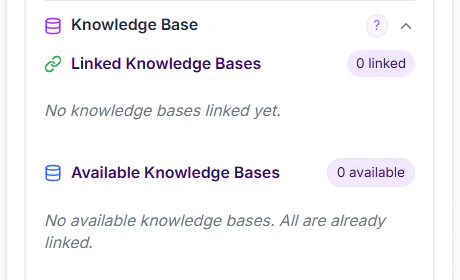 1. Go to **Agent Settings → Knowledge Base**
2. Click **Link Knowledge Base**
3. Select from available knowledge bases
4. Configure retrieval settings (see below)
5. Click **Link**
### Link via API
```bash theme={null}
POST /api/kb/{kbId}/link/{agentId}
Authorization: Bearer YOUR_API_KEY
{
"organization_id": "org_xyz123"
}
```
**Response:**
```json theme={null}
{
"success": true,
"message": "Knowledge base linked successfully"
}
```
***
## Step 3: Configure Retrieval Settings
After linking, configure how the agent searches your knowledge base:
### Chunks to Retrieve
**Default:** 5 chunks
| Value | Use Case |
| ------ | ---------------------------------------- |
| `3-5` | Simple FAQs, focused topics |
| `5-10` | Complex documentation, multiple topics |
| `10+` | Research papers, detailed technical docs |
Too many chunks can confuse the agent and increase response latency. Start with 5 and adjust based on testing.
**UI Range:** The Studio UI allows 1-10 chunks. For values outside this range, use the API.
### Similarity Threshold
**Default:** 0.7 (range: 0.0 - 1.0)
| Threshold | Behavior |
| --------- | ------------------------------------------------------ |
| `0.9+` | Very strict — only exact matches |
| `0.7-0.8` | Balanced — good for most use cases |
| `0.5-0.6` | Lenient — broader matches, may include irrelevant info |
| `< 0.5` | Not recommended — returns unrelated content |
**How it works:**
* User question is converted to vector embedding
* System searches for chunks with similarity score > threshold
* Higher threshold = more precise but may miss relevant info
* Lower threshold = more results but may include noise
### Update Settings via API
```bash theme={null}
PATCH /api/kb/{kbId}/link/{agentId}/settings
Authorization: Bearer YOUR_API_KEY
{
"chunks_to_retrieve": 7,
"similarity_threshold": 0.75
}
```
***
## Step 4: Update Agent System Prompt
Add instructions to use the knowledge base:
```
You have access to a knowledge base containing our product documentation.
## Using the Knowledge Base
- When asked about products, features, or policies, search the knowledge base first
- Always provide accurate information from the knowledge base
- If the knowledge base doesn't have the answer, say: "I don't have that information available. Let me connect you with a specialist."
- Quote specific documents when possible: "According to our Return Policy document..."
## Priority
Information from the knowledge base takes priority over your general knowledge.
```
***
## Multiple Knowledge Bases
You can link **multiple knowledge bases** to a single agent:
**Example Setup:**
```
Customer Support Agent
├── Product Documentation (chunks: 5, threshold: 0.7)
├── Return Policies (chunks: 3, threshold: 0.8)
└── FAQ Database (chunks: 5, threshold: 0.7)
```
**Search Behavior:**
* Agent searches **all linked knowledge bases** simultaneously
* Results are ranked by similarity score across all sources
* Top N chunks are retrieved (based on "chunks to retrieve" setting)
***
## Unlink Knowledge Base
### Via Studio
1. Go to **Agent Settings → Knowledge Base**
2. Find the linked knowledge base
3. Click **Unlink** (trash icon)
4. Confirm unlinking
### Via API
```bash theme={null}
DELETE /api/kb/{kbId}/link/{agentId}
Authorization: Bearer YOUR_API_KEY
{
"organization_id": "org_xyz123"
}
```
Unlinking doesn't delete the knowledge base — it just removes the connection. The KB can be linked to other agents or re-linked later.
***
## Best Practices
Create separate knowledge bases for different topics (e.g., "Product Docs", "HR Policies", "Technical Guides"). This makes retrieval more accurate.
Regularly update your knowledge base with current information. Outdated docs lead to incorrect answers.
Documents with clear headings, sections, and formatting chunk better than unstructured text.
After linking, test with real questions. Adjust chunks/threshold if answers are incomplete or irrelevant.
Begin with 5 chunks and 0.7 threshold. Increase chunks if answers lack context, decrease if responses are too long.
Duplicate information across KBs confuses retrieval. Keep each piece of info in one place.
***
## Troubleshooting
**Check:**
1. Is KB status `ready` (not `processing`)?
2. Is KB actually linked to the agent?
3. Does system prompt instruct agent to use KB?
4. Are chunks being retrieved? (Check agent logs)
**Fix:** Add explicit instructions: "Always search the knowledge base before answering questions about \[topic]."
**Problem:** Similarity threshold too low or chunks too large.
**Fix:**
* Increase threshold to 0.8 or 0.85
* Reduce chunk size to 800 characters
* Check if KB contains relevant content
**Problem:** Information not in KB or threshold too high.
**Fix:**
* Lower threshold to 0.6 or 0.65
* Add the missing document to KB
* Increase chunks to retrieve
**Problem:** Too many chunks retrieved.
**Fix:**
* Reduce chunks to retrieve (from 10 to 5, for example)
* Add to prompt: "Keep responses concise — maximum 3 sentences"
***
## API Reference
### List Linked Knowledge Bases
```bash theme={null}
GET /api/kb/agent/{agentId}/knowledge-bases?organization_id={orgId}
```
**Response:**
```json theme={null}
{
"knowledge_bases": [
{
"kb_id": "kb_abc123",
"kb_name": "Product Documentation",
"status": "ready",
"chunks_to_retrieve": 5,
"similarity_threshold": 0.7,
"chunk_count": 150
}
]
}
```
### List All Knowledge Bases
```bash theme={null}
GET /api/kb?organization_id={orgId}
```
***
## Next Steps
Upload your first document and start building your knowledge base.
Test your agent with questions that require knowledge base lookup.
Combine KB with custom functions for even more powerful agents.
1. Go to **Agent Settings → Knowledge Base**
2. Click **Link Knowledge Base**
3. Select from available knowledge bases
4. Configure retrieval settings (see below)
5. Click **Link**
### Link via API
```bash theme={null}
POST /api/kb/{kbId}/link/{agentId}
Authorization: Bearer YOUR_API_KEY
{
"organization_id": "org_xyz123"
}
```
**Response:**
```json theme={null}
{
"success": true,
"message": "Knowledge base linked successfully"
}
```
***
## Step 3: Configure Retrieval Settings
After linking, configure how the agent searches your knowledge base:
### Chunks to Retrieve
**Default:** 5 chunks
| Value | Use Case |
| ------ | ---------------------------------------- |
| `3-5` | Simple FAQs, focused topics |
| `5-10` | Complex documentation, multiple topics |
| `10+` | Research papers, detailed technical docs |
Too many chunks can confuse the agent and increase response latency. Start with 5 and adjust based on testing.
**UI Range:** The Studio UI allows 1-10 chunks. For values outside this range, use the API.
### Similarity Threshold
**Default:** 0.7 (range: 0.0 - 1.0)
| Threshold | Behavior |
| --------- | ------------------------------------------------------ |
| `0.9+` | Very strict — only exact matches |
| `0.7-0.8` | Balanced — good for most use cases |
| `0.5-0.6` | Lenient — broader matches, may include irrelevant info |
| `< 0.5` | Not recommended — returns unrelated content |
**How it works:**
* User question is converted to vector embedding
* System searches for chunks with similarity score > threshold
* Higher threshold = more precise but may miss relevant info
* Lower threshold = more results but may include noise
### Update Settings via API
```bash theme={null}
PATCH /api/kb/{kbId}/link/{agentId}/settings
Authorization: Bearer YOUR_API_KEY
{
"chunks_to_retrieve": 7,
"similarity_threshold": 0.75
}
```
***
## Step 4: Update Agent System Prompt
Add instructions to use the knowledge base:
```
You have access to a knowledge base containing our product documentation.
## Using the Knowledge Base
- When asked about products, features, or policies, search the knowledge base first
- Always provide accurate information from the knowledge base
- If the knowledge base doesn't have the answer, say: "I don't have that information available. Let me connect you with a specialist."
- Quote specific documents when possible: "According to our Return Policy document..."
## Priority
Information from the knowledge base takes priority over your general knowledge.
```
***
## Multiple Knowledge Bases
You can link **multiple knowledge bases** to a single agent:
**Example Setup:**
```
Customer Support Agent
├── Product Documentation (chunks: 5, threshold: 0.7)
├── Return Policies (chunks: 3, threshold: 0.8)
└── FAQ Database (chunks: 5, threshold: 0.7)
```
**Search Behavior:**
* Agent searches **all linked knowledge bases** simultaneously
* Results are ranked by similarity score across all sources
* Top N chunks are retrieved (based on "chunks to retrieve" setting)
***
## Unlink Knowledge Base
### Via Studio
1. Go to **Agent Settings → Knowledge Base**
2. Find the linked knowledge base
3. Click **Unlink** (trash icon)
4. Confirm unlinking
### Via API
```bash theme={null}
DELETE /api/kb/{kbId}/link/{agentId}
Authorization: Bearer YOUR_API_KEY
{
"organization_id": "org_xyz123"
}
```
Unlinking doesn't delete the knowledge base — it just removes the connection. The KB can be linked to other agents or re-linked later.
***
## Best Practices
Create separate knowledge bases for different topics (e.g., "Product Docs", "HR Policies", "Technical Guides"). This makes retrieval more accurate.
Regularly update your knowledge base with current information. Outdated docs lead to incorrect answers.
Documents with clear headings, sections, and formatting chunk better than unstructured text.
After linking, test with real questions. Adjust chunks/threshold if answers are incomplete or irrelevant.
Begin with 5 chunks and 0.7 threshold. Increase chunks if answers lack context, decrease if responses are too long.
Duplicate information across KBs confuses retrieval. Keep each piece of info in one place.
***
## Troubleshooting
**Check:**
1. Is KB status `ready` (not `processing`)?
2. Is KB actually linked to the agent?
3. Does system prompt instruct agent to use KB?
4. Are chunks being retrieved? (Check agent logs)
**Fix:** Add explicit instructions: "Always search the knowledge base before answering questions about \[topic]."
**Problem:** Similarity threshold too low or chunks too large.
**Fix:**
* Increase threshold to 0.8 or 0.85
* Reduce chunk size to 800 characters
* Check if KB contains relevant content
**Problem:** Information not in KB or threshold too high.
**Fix:**
* Lower threshold to 0.6 or 0.65
* Add the missing document to KB
* Increase chunks to retrieve
**Problem:** Too many chunks retrieved.
**Fix:**
* Reduce chunks to retrieve (from 10 to 5, for example)
* Add to prompt: "Keep responses concise — maximum 3 sentences"
***
## API Reference
### List Linked Knowledge Bases
```bash theme={null}
GET /api/kb/agent/{agentId}/knowledge-bases?organization_id={orgId}
```
**Response:**
```json theme={null}
{
"knowledge_bases": [
{
"kb_id": "kb_abc123",
"kb_name": "Product Documentation",
"status": "ready",
"chunks_to_retrieve": 5,
"similarity_threshold": 0.7,
"chunk_count": 150
}
]
}
```
### List All Knowledge Bases
```bash theme={null}
GET /api/kb?organization_id={orgId}
```
***
## Next Steps
Upload your first document and start building your knowledge base.
Test your agent with questions that require knowledge base lookup.
Combine KB with custom functions for even more powerful agents.