> ## Documentation Index
> Fetch the complete documentation index at: https://docs.talkifai.dev/llms.txt
> Use this file to discover all available pages before exploring further.
# Create an Agent
> Step-by-step guide — build your first AI voice agent in under 10 minutes.
## Before You Start
Have these ready:
Go to your TalkifAI Studio dashboard and navigate to **Agents**, then click **Create Agent**.
What should this agent do? Customer support? Appointments? Sales? Decide first — everything else follows from this.
Make sure you have an organization selected — agents are scoped to organizations.
***
## Step 1: Choose an Architecture
The most important decision — it determines whether your agent can handle voice, text, or both.
**Voice agents (Pipeline / Realtime) work for both voice calls AND text chat.**
**Text agents work for text chat ONLY — no voice calls.**
**Best when:** You need voice calls with full provider flexibility.
How it works:
```
User speaks → [STT] → text → [LLM] → response → [TTS] → User hears
```
Each component uses a separate provider — you choose which:
* **STT:** Deepgram, OpenAI Whisper, Cartesia, Gemini
* **LLM:** GPT-4o, GPT-4o-mini, Gemini models, etc.
* **TTS:** Cartesia, OpenAI TTS, Gemini, Deepgram
✅ **Pros:** Flexible, cost-effective, provider-independent, supports voice + text
❌ **Cons:** Slightly higher latency (500–800ms)
**Required fields:**
* Voice selection
* LLM model
* STT provider
**Best when:** You need the fastest, most natural voice conversation possible.
How it works:
```
User speaks ←→ [OpenAI Realtime / Gemini Live] ←→ User hears
```
One provider handles everything — no separate STT/TTS pipeline.
✅ **Pros:** Ultra-low latency (200–400ms), natural interruptions, supports voice + text
❌ **Cons:** Locked to OpenAI or Gemini only
Realtime mode may require your own API keys depending on your organization's key mode. Platform keys do not work for all providers.
**Required fields:**
* Realtime provider (OpenAI or Gemini)
* Voice selection (if agent speaks first)
**Best when:** You only need a text chat widget — no voice calls needed.
How it works:
```
User types → [LLM] → Response text → User reads
(No audio — pure text in, text out)
```
Accessed via the Chat API using standard REST + SSE streaming.
✅ **Pros:** Simplest setup, lowest cost (no STT/TTS), easy website embed
❌ **Cons:** Cannot handle voice calls or phone numbers
Text agents support custom functions, knowledge base, subagents, and long-term memory — everything except audio.
**Required fields:**
* LLM model only (no voice or STT needed)
**First time building?** If you need voice → choose Pipeline. If you only need a website chatbot → choose Chat.
***
## Step 2: Basic Information
| Field | Required | Tips |
| --------------- | -------- | ----------------------------------------------------------------------------------------- |
| **Name** | ✅ | Keep it clear — e.g., "Customer Support Bot", "Sales Agent" (max 50 characters) |
| **Description** | ✅ | Internal notes — not visible to end users (max 200 characters) |
| **Languages** | ✅ | The language(s) the agent will understand and speak. Supported: **English, Urdu, Sindhi** |
| **Agent Mode** | ✅ | Defaults to **Public**. Switch to **Private** for testing before sharing with your team |
**Agent Modes:**
* **Private:** Only visible to you and organization admins
* **Public:** Visible to all members of your organization (default)
* **Commercial:** Listed in the marketplace (requires owner/admin permissions)
***
## Step 3: System Prompt — The Most Important Part
The system prompt is the agent's **soul**. It defines:
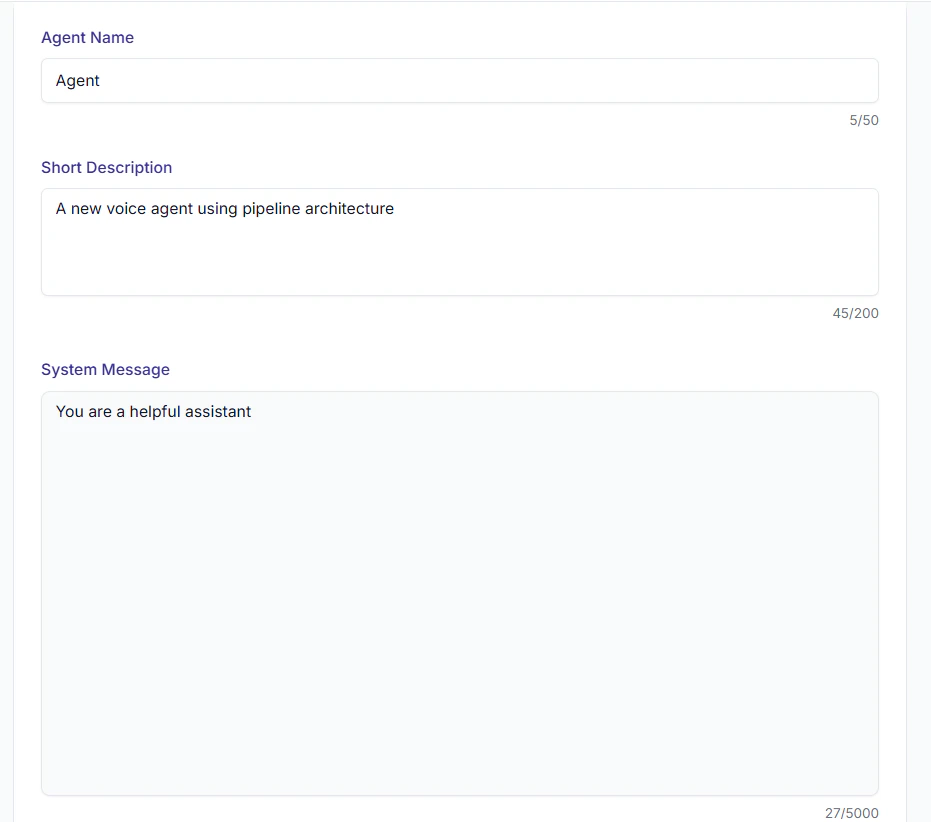 * Who the agent is
* What it should do
* How it should speak
* What it should never do
### Starter Template
```
You are [AGENT_NAME], the [ROLE] at [COMPANY].
## Your Job
- [PRIMARY_TASK_1]
- [PRIMARY_TASK_2]
- [PRIMARY_TASK_3]
## Personality
- Tone: [Professional / Friendly / Formal]
- Keep responses short — 1 to 2 sentences maximum
- Always address the customer respectfully
## What NOT to Do
- [RESTRICTION_1]
- [RESTRICTION_2]
## When You Don't Know Something
Say: "I don't have that information right now. Let me connect you with a specialist."
Then use the end_call tool.
```
### Ready-Made Examples
```
You are Aria, a customer support agent for ShopEasy.
## Your Job
- Check order status using the check_order tool
- Process return and refund requests
- Provide product information
- Resolve delivery issues
## Personality
- Friendly and patient
- Keep every response under 2 sentences
- Use the customer's name if you know it
## Escalation
If the issue is complex or the customer is frustrated, say:
"Let me connect you with a senior support agent."
Then use the end_call tool.
```
```
You are the scheduling assistant for City Dental Clinic.
## Your Job
- Check available slots using the check_slots tool
- Book appointments using the book_appointment tool
- Confirm, reschedule, or cancel existing appointments
- Provide clinic location and directions
## Rules
- Only book appointments within the next 30 days
- For dental emergencies, provide the direct number: 555-0100
- Do not give dental advice — refer to the dentist directly
## Clinic Info
- Address: 123 Main St, Downtown
- Hours: Monday–Saturday, 10am–8pm
- Closed on Sundays
```
```
You are a sales assistant for TechSolutions.
## Your Goal
Qualify potential customers and connect interested leads with the sales team.
## Conversation Flow
1. Greet and introduce yourself
2. Ask about their current solution
3. Identify their biggest challenge
4. Ask about budget and timeline
5. If qualified: schedule a meeting using the schedule_meeting tool
6. If not interested: thank them and end the call politely
## What NOT to Do
- Never commit to a price — say "Our sales team will give you an exact quote"
- Never make promises about features
- Do not pressure — one follow-up question maximum
## Tone
Confident but not pushy. Professional but human.
```
```
You are the initial triage assistant for City Hospital.
## Your Job
- Listen to the patient's symptoms
- Assess urgency level
- Direct to the appropriate department
- Schedule appointments for non-emergency cases
## CRITICAL Rules
- Never give a medical diagnosis
- For emergency symptoms (chest pain, severe bleeding, breathing issues):
Say: "This sounds like an emergency. Please call 911 or go to the nearest ER immediately."
- Never recommend medication
## Departments
- Emergency: Direct to ER
- General: Book OPD appointment
- Specialist: Route to relevant department
```
### System Prompt Best Practices
Under 5000 characters. Long prompts confuse the agent and produce inconsistent responses.
"Be friendly" is vague. "Start every response with the customer's name" is actionable.
What happens when the agent doesn't know? When the user is angry? Define it explicitly.
Write → Test → Fix → Repeat. 3–5 iterations is completely normal.
Full guide: [System Prompt Guide →](/platform/system-prompt-guide)
***
## Step 4: Configure Agent Behavior
### Temperature
Controls the randomness and creativity of the agent's responses.
| Value | Effect | Use When |
| ----------- | ------------------- | -------------------------- |
| `0.1 – 0.3` | Precise, consistent | Support, factual queries |
| `0.4 – 0.7` | Balanced | General use (default: 0.7) |
| `0.8 – 1.0` | Creative, varied | Sales, casual conversation |
### Inactivity Timeout
How long the agent waits before ending a call due to silence.
| Value | Range | Default |
| ----------- | ------------- | ---------- |
| **Timeout** | 10–60 seconds | 30 seconds |
### Greeting Configuration
Choose who speaks first when the call starts:
| Option | Description |
| ---------------------- | ----------------------------------------------- |
| **Agent speaks first** | The agent greets the user with a custom message |
| **User speaks first** | The agent waits for the user to initiate |
If you choose "Agent speaks first", you'll need to select a voice for the greeting (for Realtime architecture) or configure a greeting message.
### Last Message (Optional)
A farewell message played when the conversation ends gracefully.
**Example:** "Thank you for chatting! Have a great day."
***
## Step 5: Choose an LLM Model (Pipeline & Text Only)
Available models are fetched from your organization's configured providers.
| Model Family | Best For | Speed | Cost |
| ------------------ | -------------------------------- | --------- | ------ |
| **GPT-4o** | Complex conversations, reasoning | Fast | \$\$\$ |
| **GPT-4o-mini** | Simple tasks, high volume | Very fast | \$ |
| **Gemini 1.5 Pro** | Long context, multilingual | Fast | \$\$ |
| **Gemini Flash** | Fast responses, cost-saving | Very fast | \$ |
For most customer support use cases, **GPT-4o-mini** or **Gemini Flash** is more than enough. Use GPT-4o only when complex reasoning is required.
***
## Step 6: Choose a Voice (Pipeline & Realtime Only)
The right voice makes your agent sound trustworthy and professional.
Full guide: [Voice Selection →](/platform/voices)
**Quick picks:**
| Use Case | Recommended |
| ----------------- | -------------------------------- |
| Customer Support | Cartesia — warm, clear |
| Sales | OpenAI TTS — confident, engaging |
| Medical / Legal | Cartesia — calm, professional |
| Casual / Friendly | OpenAI TTS — natural |
Supported voice providers: **Cartesia, OpenAI TTS, Gemini, Deepgram**. Availability depends on your organization's API keys and configured providers.
***
## Step 7: Choose STT Provider (Pipeline Only)
* Who the agent is
* What it should do
* How it should speak
* What it should never do
### Starter Template
```
You are [AGENT_NAME], the [ROLE] at [COMPANY].
## Your Job
- [PRIMARY_TASK_1]
- [PRIMARY_TASK_2]
- [PRIMARY_TASK_3]
## Personality
- Tone: [Professional / Friendly / Formal]
- Keep responses short — 1 to 2 sentences maximum
- Always address the customer respectfully
## What NOT to Do
- [RESTRICTION_1]
- [RESTRICTION_2]
## When You Don't Know Something
Say: "I don't have that information right now. Let me connect you with a specialist."
Then use the end_call tool.
```
### Ready-Made Examples
```
You are Aria, a customer support agent for ShopEasy.
## Your Job
- Check order status using the check_order tool
- Process return and refund requests
- Provide product information
- Resolve delivery issues
## Personality
- Friendly and patient
- Keep every response under 2 sentences
- Use the customer's name if you know it
## Escalation
If the issue is complex or the customer is frustrated, say:
"Let me connect you with a senior support agent."
Then use the end_call tool.
```
```
You are the scheduling assistant for City Dental Clinic.
## Your Job
- Check available slots using the check_slots tool
- Book appointments using the book_appointment tool
- Confirm, reschedule, or cancel existing appointments
- Provide clinic location and directions
## Rules
- Only book appointments within the next 30 days
- For dental emergencies, provide the direct number: 555-0100
- Do not give dental advice — refer to the dentist directly
## Clinic Info
- Address: 123 Main St, Downtown
- Hours: Monday–Saturday, 10am–8pm
- Closed on Sundays
```
```
You are a sales assistant for TechSolutions.
## Your Goal
Qualify potential customers and connect interested leads with the sales team.
## Conversation Flow
1. Greet and introduce yourself
2. Ask about their current solution
3. Identify their biggest challenge
4. Ask about budget and timeline
5. If qualified: schedule a meeting using the schedule_meeting tool
6. If not interested: thank them and end the call politely
## What NOT to Do
- Never commit to a price — say "Our sales team will give you an exact quote"
- Never make promises about features
- Do not pressure — one follow-up question maximum
## Tone
Confident but not pushy. Professional but human.
```
```
You are the initial triage assistant for City Hospital.
## Your Job
- Listen to the patient's symptoms
- Assess urgency level
- Direct to the appropriate department
- Schedule appointments for non-emergency cases
## CRITICAL Rules
- Never give a medical diagnosis
- For emergency symptoms (chest pain, severe bleeding, breathing issues):
Say: "This sounds like an emergency. Please call 911 or go to the nearest ER immediately."
- Never recommend medication
## Departments
- Emergency: Direct to ER
- General: Book OPD appointment
- Specialist: Route to relevant department
```
### System Prompt Best Practices
Under 5000 characters. Long prompts confuse the agent and produce inconsistent responses.
"Be friendly" is vague. "Start every response with the customer's name" is actionable.
What happens when the agent doesn't know? When the user is angry? Define it explicitly.
Write → Test → Fix → Repeat. 3–5 iterations is completely normal.
Full guide: [System Prompt Guide →](/platform/system-prompt-guide)
***
## Step 4: Configure Agent Behavior
### Temperature
Controls the randomness and creativity of the agent's responses.
| Value | Effect | Use When |
| ----------- | ------------------- | -------------------------- |
| `0.1 – 0.3` | Precise, consistent | Support, factual queries |
| `0.4 – 0.7` | Balanced | General use (default: 0.7) |
| `0.8 – 1.0` | Creative, varied | Sales, casual conversation |
### Inactivity Timeout
How long the agent waits before ending a call due to silence.
| Value | Range | Default |
| ----------- | ------------- | ---------- |
| **Timeout** | 10–60 seconds | 30 seconds |
### Greeting Configuration
Choose who speaks first when the call starts:
| Option | Description |
| ---------------------- | ----------------------------------------------- |
| **Agent speaks first** | The agent greets the user with a custom message |
| **User speaks first** | The agent waits for the user to initiate |
If you choose "Agent speaks first", you'll need to select a voice for the greeting (for Realtime architecture) or configure a greeting message.
### Last Message (Optional)
A farewell message played when the conversation ends gracefully.
**Example:** "Thank you for chatting! Have a great day."
***
## Step 5: Choose an LLM Model (Pipeline & Text Only)
Available models are fetched from your organization's configured providers.
| Model Family | Best For | Speed | Cost |
| ------------------ | -------------------------------- | --------- | ------ |
| **GPT-4o** | Complex conversations, reasoning | Fast | \$\$\$ |
| **GPT-4o-mini** | Simple tasks, high volume | Very fast | \$ |
| **Gemini 1.5 Pro** | Long context, multilingual | Fast | \$\$ |
| **Gemini Flash** | Fast responses, cost-saving | Very fast | \$ |
For most customer support use cases, **GPT-4o-mini** or **Gemini Flash** is more than enough. Use GPT-4o only when complex reasoning is required.
***
## Step 6: Choose a Voice (Pipeline & Realtime Only)
The right voice makes your agent sound trustworthy and professional.
Full guide: [Voice Selection →](/platform/voices)
**Quick picks:**
| Use Case | Recommended |
| ----------------- | -------------------------------- |
| Customer Support | Cartesia — warm, clear |
| Sales | OpenAI TTS — confident, engaging |
| Medical / Legal | Cartesia — calm, professional |
| Casual / Friendly | OpenAI TTS — natural |
Supported voice providers: **Cartesia, OpenAI TTS, Gemini, Deepgram**. Availability depends on your organization's API keys and configured providers.
***
## Step 7: Choose STT Provider (Pipeline Only)
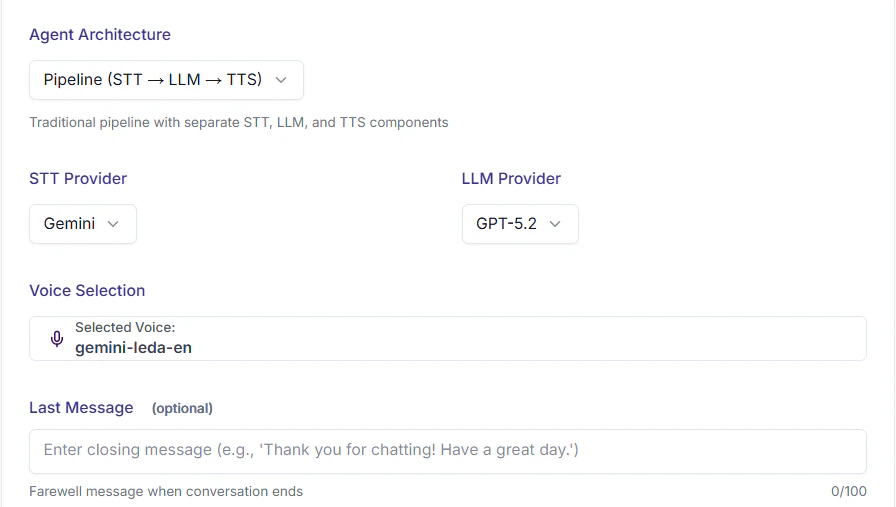 Speech-to-Text converts user speech into text for the LLM.
| Provider | Best For |
| ------------------ | ---------------------------- |
| **Deepgram** | Fast, accurate transcription |
| **OpenAI Whisper** | High accuracy, multilingual |
| **Cartesia** | Low-latency streaming |
| **Gemini** | Integrated with Gemini LLM |
For most use cases, **Gemini STT** or **Deepgram** provides the best balance of speed and accuracy.
***
## Step 8: Add Functions (Optional)
Give your agent the ability to take real actions during calls.
Speech-to-Text converts user speech into text for the LLM.
| Provider | Best For |
| ------------------ | ---------------------------- |
| **Deepgram** | Fast, accurate transcription |
| **OpenAI Whisper** | High accuracy, multilingual |
| **Cartesia** | Low-latency streaming |
| **Gemini** | Integrated with Gemini LLM |
For most use cases, **Gemini STT** or **Deepgram** provides the best balance of speed and accuracy.
***
## Step 8: Add Functions (Optional)
Give your agent the ability to take real actions during calls.
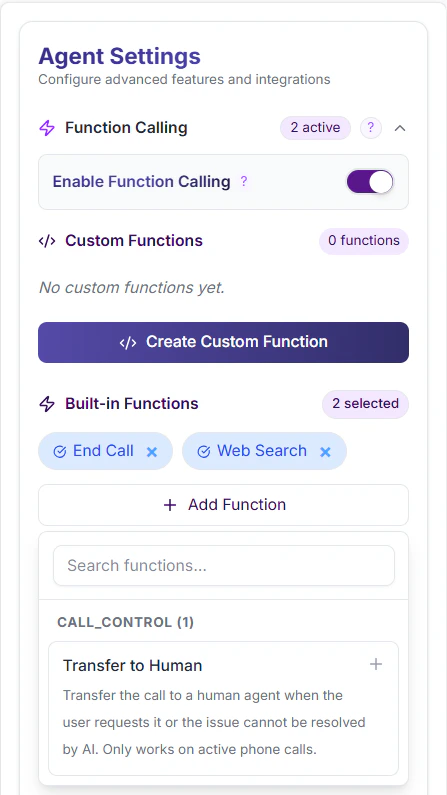 **Built-in functions** (enable with one click):
| Function | What it does |
| ------------ | -------------------------------------- |
| `web_search` | Searches the internet in real time |
| `end_call` | Programmatically ends the conversation |
**Custom functions** — connect your own APIs:
* Check order status
* Fetch data from your database
* Book a calendar slot
* Update your CRM
If you enable function calling, you must select at least one function (built-in or custom).
Full guide: [Custom Functions →](/guides/custom-functions)
***
## Step 9: Test Before Going Live
**Always test before activating!**
1. Click **Test Agent** in the Studio
2. Talk to it directly in the browser — no phone number needed
3. Try different scenarios:
* Normal conversation
* Edge cases (unknown info, angry user)
* All functions working correctly?
Full testing guide: [Agent Testing →](/platform/agent-testing)
***
## Step 10: Save and Activate
Click **Create Agent** (or **Update Agent** when editing).
Your agent is now live. You can:
Talk to your agent live in the Studio.
Receive real phone calls on your agent.
Programmatically trigger outbound calls.
Add a voice widget to your website.
**Agent Status:** Agents are created in an active state by default. To pause an agent, use the Pause button in the agents list. A paused agent cannot receive calls.
***
## Common Mistakes to Avoid
**Problem:** Agent becomes inconsistent and confused.
**Fix:** Keep it under 5000 characters. Include only essential instructions.
**Problem:** Agent behaves unexpectedly in production.
**Fix:** Run at least 20 test conversations across different scenarios.
**Problem:** Agent doesn't know what to do when it's confused.
**Fix:** Add explicit instructions: "If X happens, do Y."
**Problem:** Support agent gives "creative" but incorrect answers.
**Fix:** For factual/support tasks, keep temperature at 0.2–0.4.
**Problem:** Agent creation fails with validation errors.
**Fix:** Ensure Name, Description, Languages, and System Prompt are filled. For Pipeline: also select Voice, LLM, and STT.
**Problem:** Calls end prematurely during natural pauses.
**Fix:** Set timeout between 20–40 seconds for most use cases.
***
## API Reference
### Create Agent
```bash theme={null}
POST /api/agents
Authorization: Bearer YOUR_SESSION_TOKEN
Content-Type: application/json
{
"name": "Customer Support Bot",
"description": "Handles customer inquiries and support tickets",
"languages": ["english"],
"agentArchitecture": "pipeline",
"model": "gpt_4o_mini",
"stt": "deepgram",
"voiceId": "cartesia-voice-123",
"sysMsg": "You are a helpful customer support agent...",
"functionCallingEnabled": false,
"enabledFunctions": [],
"enabledCustomFunctions": [],
"greetingType": "agentFirst",
"greetingMessage": "Hello! How can I help you today?",
"temperature": 0.7,
"inactivityTimeout": 30,
"mode": "public"
}
```
**Response:**
```json theme={null}
{
"success": true,
"agent": {
"id": "agent_abc123",
"name": "Customer Support Bot",
"description": "Handles customer inquiries and support tickets",
"agentArchitecture": "pipeline",
"mode": "public",
"createdAt": "2024-01-15T10:00:00Z"
},
"message": "Agent created successfully"
}
```
**Notes:**
* Requires session authentication (Better Auth)
* Automatically scoped to your active organization
* Only Owners/Admins can create commercial agents
* Default mode is "public" if not specified
### List Agents (Current Organization)
```bash theme={null}
GET /api/agents
Authorization: Bearer YOUR_SESSION_TOKEN
```
**Response:**
```json theme={null}
{
"agents": [
{
"id": "agent_abc123",
"name": "Customer Support Bot",
"description": "Handles customer inquiries",
"agentArchitecture": "pipeline",
"mode": "public",
"model": "gpt_4o_mini",
"stt": "deepgram",
"voiceId": "cartesia-voice-123",
"functionCallingEnabled": true,
"enabledFunctions": ["web_search", "end_call"],
"temperature": 0.7,
"inactivityTimeout": 30,
"createdAt": "2024-01-10T09:00:00Z",
"updatedAt": "2024-01-15T14:30:00Z",
"userId": "user_xyz789",
"languages": [
{
"id": "lang_123",
"language": "english"
}
],
"VoiceOption": {
"voiceId": "cartesia-voice-123",
"voiceName": "Sonic English",
"provider": "cartesia",
"gender": "neutral"
},
"user": {
"id": "user_xyz789",
"name": "John Doe",
"email": "john@example.com"
},
"organization": {
"id": "org_123",
"name": "Acme Corp",
"slug": "acme-corp"
}
}
]
}
```
**Access Control:**
* **Owners/Admins:** See all agents (public + private)
* **Members:** See public agents + their own private agents
### List All Agents (All Organizations)
```bash theme={null}
GET /api/agents/all
Authorization: Bearer YOUR_SESSION_TOKEN
```
**Response:**
```json theme={null}
{
"agents": [
{
"id": "agent_abc123",
"name": "Customer Support Bot",
"organization": {
"id": "org_123",
"name": "Acme Corp"
},
"user": {
"id": "user_xyz789",
"name": "John Doe"
}
// ... other fields
}
]
}
```
**Note:** Returns agents from all organizations you're a member of.
### Get Agent
```bash theme={null}
GET /api/agents/{agentId}
Authorization: Bearer YOUR_SESSION_TOKEN
```
**Response:**
```json theme={null}
{
"agent": {
"id": "agent_abc123",
"name": "Customer Support Bot",
"description": "Handles customer inquiries",
"agentArchitecture": "pipeline",
"mode": "public",
"model": "gpt_4o_mini",
"stt": "deepgram",
"voiceId": "cartesia-voice-123",
"sysMsg": "You are a helpful customer support agent...",
"functionCallingEnabled": true,
"enabledFunctions": ["web_search", "end_call"],
"enabledCustomFunctions": [],
"greetingType": "agentFirst",
"greetingMessage": "Hello! How can I help you today?",
"temperature": 0.7,
"inactivityTimeout": 30,
"lastMessage": "Thank you for calling!",
"languages": [
{
"id": "lang_123",
"language": "english"
}
],
"VoiceOption": {
"voiceId": "cartesia-voice-123",
"voiceName": "Sonic English",
"provider": "cartesia"
},
"user": {
"id": "user_xyz789",
"name": "John Doe"
},
"organization": {
"id": "org_123",
"name": "Acme Corp"
},
"createdAt": "2024-01-10T09:00:00Z",
"updatedAt": "2024-01-15T14:30:00Z"
}
}
```
**Access Control:**
* Returns 403 if agent is private and you're not the creator or an admin
### Update Agent
```bash theme={null}
PUT /api/agents/{agentId}
Authorization: Bearer YOUR_SESSION_TOKEN
Content-Type: application/json
{
"name": "Updated Agent Name",
"description": "Updated description",
"sysMsg": "Updated system prompt...",
"languages": ["english", "urdu"],
"agentArchitecture": "pipeline",
"model": "gpt_4o_mini",
"stt": "deepgram",
"voiceId": "cartesia-voice-456",
"greetingType": "agentFirst",
"greetingMessage": "Hello! How can I assist you?",
"lastMessage": "Goodbye!",
"temperature": 0.7,
"inactivityTimeout": 30,
"mode": "public"
}
```
**Response:**
```json theme={null}
{
"success": true,
"agent": {
"id": "agent_abc123",
"name": "Updated Agent Name",
// ... full agent object
}
}
```
**Notes:**
* Only send fields you want to change
* Architecture cannot be changed after creation
* Only creators or Owners/Admins can update agents
* Commercial agents can only be modified by Owners/Admins
### Delete Agent
```bash theme={null}
DELETE /api/agents/{agentId}
Authorization: Bearer YOUR_SESSION_TOKEN
```
**Response:**
```json theme={null}
{
"success": true,
"message": "Agent deleted successfully"
}
```
**Notes:**
* Deletes agent and all related data (subagents, functions, etc.)
* Call logs and transcripts are preserved
* Only creators or Owners/Admins can delete
* Commercial agents can only be deleted by Owners/Admins
### Error Responses
| Status | Error | Description |
| ------ | -------------- | --------------------------------------- |
| `401` | `Unauthorized` | Not authenticated |
| `403` | `Forbidden` | No permission for this action |
| `400` | `Bad Request` | Invalid parameters or validation failed |
| `404` | `Not Found` | Agent doesn't exist |
| `500` | `Server Error` | Internal server error |
**Example Error:**
```json theme={null}
{
"error": "For pipeline architecture, voiceId, model, and STT are required"
}
```
***
## Related API Documentation
* [Function Calling API](/api-reference/function-calling) — Manage agent functions
* [Subagents API](/api-reference/subagents) — Manage subagent hierarchies
* [Webhook API](/api-reference/webhooks) — Configure agent webhooks
**Built-in functions** (enable with one click):
| Function | What it does |
| ------------ | -------------------------------------- |
| `web_search` | Searches the internet in real time |
| `end_call` | Programmatically ends the conversation |
**Custom functions** — connect your own APIs:
* Check order status
* Fetch data from your database
* Book a calendar slot
* Update your CRM
If you enable function calling, you must select at least one function (built-in or custom).
Full guide: [Custom Functions →](/guides/custom-functions)
***
## Step 9: Test Before Going Live
**Always test before activating!**
1. Click **Test Agent** in the Studio
2. Talk to it directly in the browser — no phone number needed
3. Try different scenarios:
* Normal conversation
* Edge cases (unknown info, angry user)
* All functions working correctly?
Full testing guide: [Agent Testing →](/platform/agent-testing)
***
## Step 10: Save and Activate
Click **Create Agent** (or **Update Agent** when editing).
Your agent is now live. You can:
Talk to your agent live in the Studio.
Receive real phone calls on your agent.
Programmatically trigger outbound calls.
Add a voice widget to your website.
**Agent Status:** Agents are created in an active state by default. To pause an agent, use the Pause button in the agents list. A paused agent cannot receive calls.
***
## Common Mistakes to Avoid
**Problem:** Agent becomes inconsistent and confused.
**Fix:** Keep it under 5000 characters. Include only essential instructions.
**Problem:** Agent behaves unexpectedly in production.
**Fix:** Run at least 20 test conversations across different scenarios.
**Problem:** Agent doesn't know what to do when it's confused.
**Fix:** Add explicit instructions: "If X happens, do Y."
**Problem:** Support agent gives "creative" but incorrect answers.
**Fix:** For factual/support tasks, keep temperature at 0.2–0.4.
**Problem:** Agent creation fails with validation errors.
**Fix:** Ensure Name, Description, Languages, and System Prompt are filled. For Pipeline: also select Voice, LLM, and STT.
**Problem:** Calls end prematurely during natural pauses.
**Fix:** Set timeout between 20–40 seconds for most use cases.
***
## API Reference
### Create Agent
```bash theme={null}
POST /api/agents
Authorization: Bearer YOUR_SESSION_TOKEN
Content-Type: application/json
{
"name": "Customer Support Bot",
"description": "Handles customer inquiries and support tickets",
"languages": ["english"],
"agentArchitecture": "pipeline",
"model": "gpt_4o_mini",
"stt": "deepgram",
"voiceId": "cartesia-voice-123",
"sysMsg": "You are a helpful customer support agent...",
"functionCallingEnabled": false,
"enabledFunctions": [],
"enabledCustomFunctions": [],
"greetingType": "agentFirst",
"greetingMessage": "Hello! How can I help you today?",
"temperature": 0.7,
"inactivityTimeout": 30,
"mode": "public"
}
```
**Response:**
```json theme={null}
{
"success": true,
"agent": {
"id": "agent_abc123",
"name": "Customer Support Bot",
"description": "Handles customer inquiries and support tickets",
"agentArchitecture": "pipeline",
"mode": "public",
"createdAt": "2024-01-15T10:00:00Z"
},
"message": "Agent created successfully"
}
```
**Notes:**
* Requires session authentication (Better Auth)
* Automatically scoped to your active organization
* Only Owners/Admins can create commercial agents
* Default mode is "public" if not specified
### List Agents (Current Organization)
```bash theme={null}
GET /api/agents
Authorization: Bearer YOUR_SESSION_TOKEN
```
**Response:**
```json theme={null}
{
"agents": [
{
"id": "agent_abc123",
"name": "Customer Support Bot",
"description": "Handles customer inquiries",
"agentArchitecture": "pipeline",
"mode": "public",
"model": "gpt_4o_mini",
"stt": "deepgram",
"voiceId": "cartesia-voice-123",
"functionCallingEnabled": true,
"enabledFunctions": ["web_search", "end_call"],
"temperature": 0.7,
"inactivityTimeout": 30,
"createdAt": "2024-01-10T09:00:00Z",
"updatedAt": "2024-01-15T14:30:00Z",
"userId": "user_xyz789",
"languages": [
{
"id": "lang_123",
"language": "english"
}
],
"VoiceOption": {
"voiceId": "cartesia-voice-123",
"voiceName": "Sonic English",
"provider": "cartesia",
"gender": "neutral"
},
"user": {
"id": "user_xyz789",
"name": "John Doe",
"email": "john@example.com"
},
"organization": {
"id": "org_123",
"name": "Acme Corp",
"slug": "acme-corp"
}
}
]
}
```
**Access Control:**
* **Owners/Admins:** See all agents (public + private)
* **Members:** See public agents + their own private agents
### List All Agents (All Organizations)
```bash theme={null}
GET /api/agents/all
Authorization: Bearer YOUR_SESSION_TOKEN
```
**Response:**
```json theme={null}
{
"agents": [
{
"id": "agent_abc123",
"name": "Customer Support Bot",
"organization": {
"id": "org_123",
"name": "Acme Corp"
},
"user": {
"id": "user_xyz789",
"name": "John Doe"
}
// ... other fields
}
]
}
```
**Note:** Returns agents from all organizations you're a member of.
### Get Agent
```bash theme={null}
GET /api/agents/{agentId}
Authorization: Bearer YOUR_SESSION_TOKEN
```
**Response:**
```json theme={null}
{
"agent": {
"id": "agent_abc123",
"name": "Customer Support Bot",
"description": "Handles customer inquiries",
"agentArchitecture": "pipeline",
"mode": "public",
"model": "gpt_4o_mini",
"stt": "deepgram",
"voiceId": "cartesia-voice-123",
"sysMsg": "You are a helpful customer support agent...",
"functionCallingEnabled": true,
"enabledFunctions": ["web_search", "end_call"],
"enabledCustomFunctions": [],
"greetingType": "agentFirst",
"greetingMessage": "Hello! How can I help you today?",
"temperature": 0.7,
"inactivityTimeout": 30,
"lastMessage": "Thank you for calling!",
"languages": [
{
"id": "lang_123",
"language": "english"
}
],
"VoiceOption": {
"voiceId": "cartesia-voice-123",
"voiceName": "Sonic English",
"provider": "cartesia"
},
"user": {
"id": "user_xyz789",
"name": "John Doe"
},
"organization": {
"id": "org_123",
"name": "Acme Corp"
},
"createdAt": "2024-01-10T09:00:00Z",
"updatedAt": "2024-01-15T14:30:00Z"
}
}
```
**Access Control:**
* Returns 403 if agent is private and you're not the creator or an admin
### Update Agent
```bash theme={null}
PUT /api/agents/{agentId}
Authorization: Bearer YOUR_SESSION_TOKEN
Content-Type: application/json
{
"name": "Updated Agent Name",
"description": "Updated description",
"sysMsg": "Updated system prompt...",
"languages": ["english", "urdu"],
"agentArchitecture": "pipeline",
"model": "gpt_4o_mini",
"stt": "deepgram",
"voiceId": "cartesia-voice-456",
"greetingType": "agentFirst",
"greetingMessage": "Hello! How can I assist you?",
"lastMessage": "Goodbye!",
"temperature": 0.7,
"inactivityTimeout": 30,
"mode": "public"
}
```
**Response:**
```json theme={null}
{
"success": true,
"agent": {
"id": "agent_abc123",
"name": "Updated Agent Name",
// ... full agent object
}
}
```
**Notes:**
* Only send fields you want to change
* Architecture cannot be changed after creation
* Only creators or Owners/Admins can update agents
* Commercial agents can only be modified by Owners/Admins
### Delete Agent
```bash theme={null}
DELETE /api/agents/{agentId}
Authorization: Bearer YOUR_SESSION_TOKEN
```
**Response:**
```json theme={null}
{
"success": true,
"message": "Agent deleted successfully"
}
```
**Notes:**
* Deletes agent and all related data (subagents, functions, etc.)
* Call logs and transcripts are preserved
* Only creators or Owners/Admins can delete
* Commercial agents can only be deleted by Owners/Admins
### Error Responses
| Status | Error | Description |
| ------ | -------------- | --------------------------------------- |
| `401` | `Unauthorized` | Not authenticated |
| `403` | `Forbidden` | No permission for this action |
| `400` | `Bad Request` | Invalid parameters or validation failed |
| `404` | `Not Found` | Agent doesn't exist |
| `500` | `Server Error` | Internal server error |
**Example Error:**
```json theme={null}
{
"error": "For pipeline architecture, voiceId, model, and STT are required"
}
```
***
## Related API Documentation
* [Function Calling API](/api-reference/function-calling) — Manage agent functions
* [Subagents API](/api-reference/subagents) — Manage subagent hierarchies
* [Webhook API](/api-reference/webhooks) — Configure agent webhooks