> ## Documentation Index
> Fetch the complete documentation index at: https://docs.talkifai.dev/llms.txt
> Use this file to discover all available pages before exploring further.
# Billing & Credits
> Manage your organization's credits, view transaction history, and add funds via Lemon Squeezy.
## Overview
The **Billing & Credits** page is your central hub for managing your organization's credit balance. View real-time balance, track all transactions (top-ups and usage), and add more credits when needed.
**Navigation:** **Studio → Billing**
**URL:** `/billing`
**Access:** All organization members can view billing. Only Owners can add credits.
***
## Page Layout
### Header Section
**Title:** "Billing & Credits"
* Large gradient text (purple brand color)
* Subtitle: "Manage your credits and view transaction history"
**Action Buttons (Top Right):**
1. **Add Credits** (Green button)
* Opens Lemon Squeezy checkout
* Opens in new tab
* Shows loading spinner during processing
2. **Refresh** (Outline button)
* Reloads transaction history
* Shows spinning refresh icon
* Updates balance in real-time
### Stats Cards (4 Cards)
**Card 1: Current Balance** (Purple Gradient)
* **Icon:** Wallet
* **Value:** `$XX.XX` (large, bold)
* **Label:** "Available credits"
* **Color:** White text on purple gradient
**Card 2: Total Top-ups** (Gray Gradient)
* **Icon:** Trending Up
* **Value:** `+$XX.XX` (green tint)
* **Label:** "Credits added"
* **Color:** White text on gray gradient
**Card 3: Total Usage** (White Card)
* **Icon:** Arrow Down Right
* **Value:** `-$XX.XX` (red tint)
* **Label:** "Credits consumed"
* **Color:** Black text on white background
**Card 4: Total Transactions** (Black Gradient)
* **Icon:** Credit Card
* **Value:** `XXX` (count)
* **Label:** "All time"
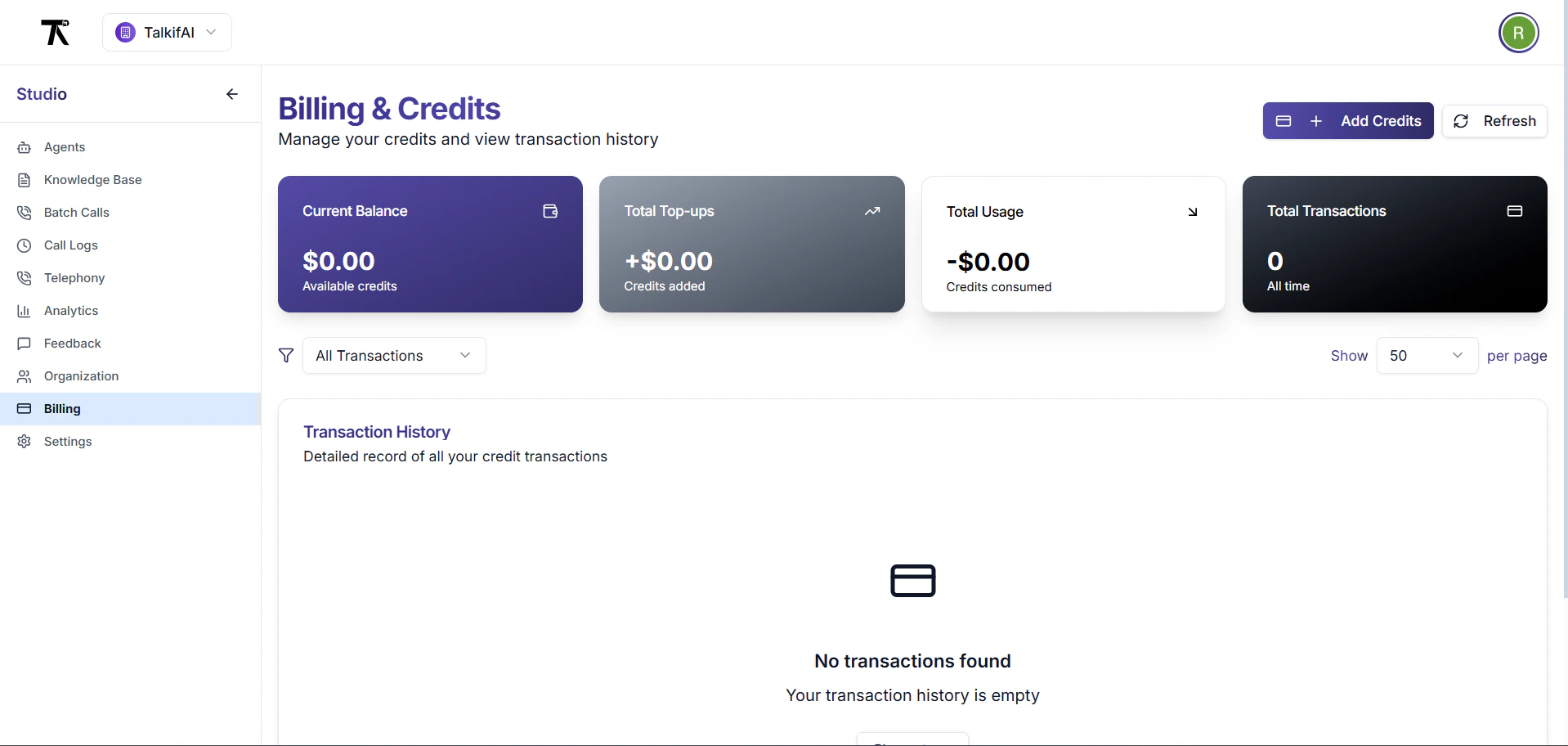 * **Color:** White text on black gradient
***
## Transaction History Table
### Table Columns
| Column | Description | Example |
| --------------- | -------------------------------------- | --------------------------------- |
| **Date & Time** | When transaction occurred | "Jan 15, 2024 14:30" |
| **Type** | Transaction type badge | Top-up (green) / Usage (red) |
| **Description** | What the transaction was for | "Credit top-up via Lemon Squeezy" |
| **Amount** | Credit amount (green for +, red for -) | `+$50.0000` or `-$0.1523` |
| **Balance** | Balance after transaction | `$149.8477` |
### Transaction Types
**Top-ups** (Green Badge):
* Credit purchases via Lemon Squeezy
* Manual credit grants (admin)
* Welcome credits (new orgs)
* Startup grant credits
**Usage** (Red Badge):
* Voice call charges
* Chat session charges
* API usage charges
* Any service consumption
**Other Types** (Future):
* `refund` — Credits refunded
* `adjustment` — Manual balance adjustments
### Transaction Icons
| Type | Icon | Color |
| ---------- | ---------------- | ----- |
| **Top-up** | Arrow Up Right | Green |
| **Usage** | Arrow Down Right | Red |
| **Other** | Dollar Sign | Gray |
***
## Filters & Controls
### Filter by Type
**Dropdown Options:**
* **All Transactions** (default)
* **Top-ups** (only credit additions)
* **Usage** (only credit consumption)
**Behavior:**
* Filters table in real-time
* Resets to page 1 when changed
* Shows "No transactions found" if empty
### Items Per Page
**Options:** 10, 25, 50, 100
**Default:** 50 transactions per page
**Behavior:**
* Changes table pagination
* Resets to page 1 when changed
* Shows total count in footer
***
## Pagination
### Page Navigation
**Components:**
* **Previous Button** (disabled on page 1)
* **Page Numbers** (1, 2, 3, ...)
* **Next Button** (disabled on last page)
**Info Text:**
```
Showing 1 to 50 of 250 transactions
```
**Behavior:**
* Click page number to jump
* Previous/Next navigate sequentially
* Disabled states are grayed out
***
## Adding Credits
### "Add Credits" Button
**Location:** Top-right corner
**Appearance:**
* Green background
* Plus icon
* "Add Credits" text
* Hover: Darker green
### Checkout Flow
**Step 1: Click "Add Credits"**
* Opens Lemon Squeezy checkout popup
* Overlay appears on screen
* Loading spinner shows
**Step 2: Select Package**
* Multiple credit packages shown
* Example: $10, $50, $100, $500
* Bulk discounts may apply
**Step 3: Payment**
* Enter card details
* Complete payment via Lemon Squeezy
* Secure payment processing
**Step 4: Credits Added**
* Redirects back to Billing page
* Balance updates automatically
* Transaction appears in history
* Toast notification: "Credits added successfully!"
### Payment Methods
**Accepted:**
* Credit/Debit Cards (Visa, Mastercard, Amex)
* Digital Wallets (Apple Pay, Google Pay)
* Bank Transfer (for large amounts)
**Security:**
* PCI DSS compliant
* Encrypted transactions
* No card data stored on TalkifAI servers
***
## Transaction Details
### Description Examples
**Top-up Transactions:**
* "Credit top-up via Lemon Squeezy - \$50.00"
* "Welcome credit - New organization bonus"
* "Manual credit grant - Admin adjustment"
* "Startup grant credit - Approved application"
**Usage Transactions:**
* "Voice call session - agent\_abc123 - 3.5 min"
* "Chat session - agent\_xyz789 - 25 messages"
* "API usage - Batch calling - 150 contacts"
* "Service consumption - Realtime agent - 10 min"
### Balance Tracking
**Balance Columns:**
* **Balance Before** — Balance before transaction
* **Amount** — Transaction amount (+/-)
* **Balance After** — New balance
**Example Flow:**
```
Balance Before: $100.00
Top-up: +$50.00
Balance After: $150.00
Balance After: $150.00
Usage: -$0.15
Balance After: $149.85
```
***
## Empty State
### When No Transactions Exist
**Visual Elements:**
1. **Icon:** Large credit card icon (gray circle)
2. **Heading:** "No transactions found"
3. **Subtext:**
* If filtered: "No \[type] transactions in your history"
* If empty: "Your transaction history is empty"
4. **Action Button:** "Refresh"
**Action:**
* Click "Refresh" to reload
* Or add credits to create first transaction
***
## Loading States
### Skeleton Loading
**When:** Fetching transaction history
**Visual:**
* Gray placeholder cards (4 stats cards)
* Skeleton table rows (5 rows)
* Animated pulse effect
* Duration: 1-2 seconds
### Refresh State
**When:** Clicking refresh button
**Visual:**
* Spinner icon on refresh button
* Button disabled during refresh
* Table remains visible (no skeleton)
* Toast on completion
***
## Error States
### Fetch Error
**When:** API fails to load transactions
**Alert Box (Red):**
* **Icon:** Alert circle
* **Title:** "Failed to load transaction history"
* **Message:** "Please try again later"
* **Action:** Click "Refresh" button
### Empty Filter Results
**When:** Filter shows no matching transactions
**Message:**
* "No \[type] transactions in your history"
* Example: "No Top-ups transactions in your history"
**Action:**
* Change filter to "All Transactions"
* Or add credits if no top-ups
***
## Real-Time Updates
### Auto-Refresh
**Current Behavior:**
* Manual refresh required
* Click refresh button
* Or navigate away and back
**Future Features:**
* Auto-refresh every 30 seconds
* WebSocket for real-time balance updates
* Toast notifications for transactions
### Cross-Tab Sync
**Implementation:**
* Uses `CustomEvent` for cross-tab communication
* Event name: `billingUpdated`
**Events:**
* `credit_added` — Credits added via checkout
* `credit_consumed` — Credits used for service
* `balance_updated` — Balance changed
**Behavior:**
* If transaction in one tab
* Other tabs receive event
* Balance updates automatically
* No manual refresh needed
***
## Transaction History API
### Fetch Transactions
**Endpoint:**
```bash theme={null}
GET /api/billing/history?limit=1000&offset=0
Authorization: Bearer YOUR_SESSION_TOKEN
```
**Response:**
```json theme={null}
{
"success": true,
"data": [
{
"id": "txn_abc123",
"type": "topup",
"amount": 50.0000,
"balance_before": 100.0000,
"balance_after": 150.0000,
"description": "Credit top-up via Lemon Squeezy",
"billing_session_id": null,
"metadata": {
"payment_method": "lemon_squeezy",
"variant_id": "variant_123"
},
"created_at": "2024-01-15T14:30:00Z"
},
{
"id": "txn_def456",
"type": "consumption",
"amount": -0.1523,
"balance_before": 150.0000,
"balance_after": 149.8477,
"description": "Voice call session - agent_abc123 - 3.5 min",
"billing_session_id": "session_xyz789",
"metadata": {
"agent_id": "agent_abc123",
"duration_seconds": 210,
"session_type": "webcall"
},
"created_at": "2024-01-15T14:35:00Z"
}
]
}
```
### Get Current Balance
**Endpoint:**
```bash theme={null}
GET /api/billing/balance/{organizationId}
Authorization: Bearer YOUR_SESSION_TOKEN
```
**Response:**
```json theme={null}
{
"success": true,
"balance": 149.8477
}
```
***
## Billing Sessions
### What is a Billing Session?
A billing session represents a single usage event (call, chat, API call) that consumes credits.
**Session Details:**
* Session ID
* Agent used
* Duration/message count
* Cost breakdown
* Timestamps
### View Session Details
**From Transaction:**
1. Find usage transaction in table
2. Click on transaction row
3. Opens session detail panel
4. Shows full breakdown
**Session Detail Panel:**
* Agent name & architecture
* Call duration / message count
* Cost breakdown (base, model, STT, TTS)
* Transcript (if available)
* Recording (if enabled)
* Post-call analysis (if configured)
***
## Credit System
### How Credits Work
**1 Credit = \$1.00 USD**
**Usage Deduction:**
* Real-time deduction as service is used
* Fractional credits supported (4 decimal places)
* Deducted at session end
**Example Usage:**
```
Voice Call (3.5 minutes):
- Base cost: $0.175
- LLM cost: $0.053
- STT cost: $0.011
- TTS cost: $0.018
Total: $0.257 credits
```
### Low Balance Warning
**Warning Threshold:** \$5.00
**When Balance \< \$5.00:**
* Warning banner appears
* "Add Credits" button highlighted
* Email notification sent
* Can still make calls until \$0.00
**When Balance = \$0.00:**
* Cannot initiate new calls
* Existing calls complete normally
* Must add credits to continue
### Grace Period
**Grace Period Limit:** \$5.00 (configurable)
**How It Works:**
* Can go negative up to -\$5.00
* Allows completing ongoing calls
* Must add credits to restore positive balance
* Negative balance shown in red
***
## Pricing & Cost Calculation
### Cost Components
**Voice Calls (Pipeline):**
* **Base Cost:** Infrastructure fee (\~\$0.05/min)
* **LLM Cost:** AI processing (\~\$0.015/min)
* **STT Cost:** Speech-to-text (\~\$0.003/min)
* **TTS Cost:** Text-to-speech (\~\$0.005/min)
**Voice Calls (Realtime):**
* **Base Cost:** Infrastructure fee (\~\$0.05/min)
* **Model Cost:** Realtime model (\~\$0.06/min, includes STT/TTS)
**Chat Sessions:**
* **LLM Cost:** Per message (\~\$0.001/message)
* No base/STT/TTS costs
### Cost Display
**Precision:** 4 decimal places
**Example:**
* `$0.1523` — Typical 3-minute call
* `$0.0045` — Short chat session
* `$50.0000` — Credit top-up
**Rounding:**
* Costs rounded to 4 decimals
* Balance shown to 2 decimals
* Internal calculations use full precision
***
## Troubleshooting
**Problem:** Balance shows old value after adding credits
**Solutions:**
1. Click "Refresh" button
2. Wait 30 seconds (payment processing)
3. Check email for payment confirmation
4. Contact support if not updated after 5 minutes
**Problem:** Expected transaction not in history
**Check:**
1. Refresh page
2. Check "All Transactions" filter
3. Increase "Items per page" to 100
4. Check date range (oldest first)
5. Verify payment email confirmation
**Problem:** Clicking "Add Credits" does nothing
**Solution:**
1. Check browser popup blocker
2. Allow popups for TalkifAI domain
3. Try in different browser
4. Or copy checkout link from error message
**Problem:** Balance shows negative value
**Explanation:**
* You're in grace period (-$5.00 to $0.00)
* Calls consumed more than available balance
* Must add credits to restore positive balance
**Action:**
1. Click "Add Credits"
2. Add sufficient credits to cover negative balance
3. Balance becomes positive immediately
**Problem:** Transaction amount seems incorrect
**Check:**
1. Click transaction to view session details
2. Review duration/message count
3. Check cost breakdown
4. Verify agent architecture (Realtime costs more)
5. Contact support with session ID if still incorrect
***
## Security & Compliance
### Payment Security
**Lemon Squeezy Compliance:**
* PCI DSS Level 1 certified
* SOC 2 Type II compliant
* GDPR compliant
* Encrypted payment processing
**Data Protection:**
* No card data stored on TalkifAI servers
* All payments processed by Lemon Squeezy
* Transaction records encrypted at rest
* Access logged and audited
### Access Control
**Who Can View:**
* ✅ All organization members
* ✅ Owners, Admins, Members
**Who Can Add Credits:**
* ✅ Owners only
* ❌ Admins (view only)
* ❌ Members (view only)
**Audit Trail:**
* All transactions logged
* User who added credits recorded
* Timestamp and IP logged
* Accessible in transaction history
***
## Related Documentation
* [Organization Management](/platform/organization) — Manage organizations and billing settings
* [API Keys](/platform/api-keys) — Manage API keys for billing
* [Call Logs](/platform/call-logs) — View detailed call costs
* [Analytics](/platform/analytics) — Usage metrics and trends
***
## API Reference
### List Transactions
```bash theme={null}
GET /api/billing/history?limit=100&offset=0
Authorization: Bearer YOUR_SESSION_TOKEN
```
**Response:**
```json theme={null}
{
"success": true,
"data": [
{
"id": "txn_abc123",
"type": "topup",
"amount": 50.0000,
"balance_before": 100.0000,
"balance_after": 150.0000,
"description": "Credit top-up via Lemon Squeezy",
"created_at": "2024-01-15T14:30:00Z"
}
]
}
```
### Get Balance
```bash theme={null}
GET /api/billing/balance/{organizationId}
Authorization: Bearer YOUR_SESSION_TOKEN
```
### Create Checkout Session
```bash theme={null}
POST /api/billing/checkout
Content-Type: application/json
{
"variantId": "variant_123"
}
```
**Response:**
```json theme={null}
{
"success": true,
"checkout_url": "https://checkout.lemonsqueezy.com/..."
}
```
* **Color:** White text on black gradient
***
## Transaction History Table
### Table Columns
| Column | Description | Example |
| --------------- | -------------------------------------- | --------------------------------- |
| **Date & Time** | When transaction occurred | "Jan 15, 2024 14:30" |
| **Type** | Transaction type badge | Top-up (green) / Usage (red) |
| **Description** | What the transaction was for | "Credit top-up via Lemon Squeezy" |
| **Amount** | Credit amount (green for +, red for -) | `+$50.0000` or `-$0.1523` |
| **Balance** | Balance after transaction | `$149.8477` |
### Transaction Types
**Top-ups** (Green Badge):
* Credit purchases via Lemon Squeezy
* Manual credit grants (admin)
* Welcome credits (new orgs)
* Startup grant credits
**Usage** (Red Badge):
* Voice call charges
* Chat session charges
* API usage charges
* Any service consumption
**Other Types** (Future):
* `refund` — Credits refunded
* `adjustment` — Manual balance adjustments
### Transaction Icons
| Type | Icon | Color |
| ---------- | ---------------- | ----- |
| **Top-up** | Arrow Up Right | Green |
| **Usage** | Arrow Down Right | Red |
| **Other** | Dollar Sign | Gray |
***
## Filters & Controls
### Filter by Type
**Dropdown Options:**
* **All Transactions** (default)
* **Top-ups** (only credit additions)
* **Usage** (only credit consumption)
**Behavior:**
* Filters table in real-time
* Resets to page 1 when changed
* Shows "No transactions found" if empty
### Items Per Page
**Options:** 10, 25, 50, 100
**Default:** 50 transactions per page
**Behavior:**
* Changes table pagination
* Resets to page 1 when changed
* Shows total count in footer
***
## Pagination
### Page Navigation
**Components:**
* **Previous Button** (disabled on page 1)
* **Page Numbers** (1, 2, 3, ...)
* **Next Button** (disabled on last page)
**Info Text:**
```
Showing 1 to 50 of 250 transactions
```
**Behavior:**
* Click page number to jump
* Previous/Next navigate sequentially
* Disabled states are grayed out
***
## Adding Credits
### "Add Credits" Button
**Location:** Top-right corner
**Appearance:**
* Green background
* Plus icon
* "Add Credits" text
* Hover: Darker green
### Checkout Flow
**Step 1: Click "Add Credits"**
* Opens Lemon Squeezy checkout popup
* Overlay appears on screen
* Loading spinner shows
**Step 2: Select Package**
* Multiple credit packages shown
* Example: $10, $50, $100, $500
* Bulk discounts may apply
**Step 3: Payment**
* Enter card details
* Complete payment via Lemon Squeezy
* Secure payment processing
**Step 4: Credits Added**
* Redirects back to Billing page
* Balance updates automatically
* Transaction appears in history
* Toast notification: "Credits added successfully!"
### Payment Methods
**Accepted:**
* Credit/Debit Cards (Visa, Mastercard, Amex)
* Digital Wallets (Apple Pay, Google Pay)
* Bank Transfer (for large amounts)
**Security:**
* PCI DSS compliant
* Encrypted transactions
* No card data stored on TalkifAI servers
***
## Transaction Details
### Description Examples
**Top-up Transactions:**
* "Credit top-up via Lemon Squeezy - \$50.00"
* "Welcome credit - New organization bonus"
* "Manual credit grant - Admin adjustment"
* "Startup grant credit - Approved application"
**Usage Transactions:**
* "Voice call session - agent\_abc123 - 3.5 min"
* "Chat session - agent\_xyz789 - 25 messages"
* "API usage - Batch calling - 150 contacts"
* "Service consumption - Realtime agent - 10 min"
### Balance Tracking
**Balance Columns:**
* **Balance Before** — Balance before transaction
* **Amount** — Transaction amount (+/-)
* **Balance After** — New balance
**Example Flow:**
```
Balance Before: $100.00
Top-up: +$50.00
Balance After: $150.00
Balance After: $150.00
Usage: -$0.15
Balance After: $149.85
```
***
## Empty State
### When No Transactions Exist
**Visual Elements:**
1. **Icon:** Large credit card icon (gray circle)
2. **Heading:** "No transactions found"
3. **Subtext:**
* If filtered: "No \[type] transactions in your history"
* If empty: "Your transaction history is empty"
4. **Action Button:** "Refresh"
**Action:**
* Click "Refresh" to reload
* Or add credits to create first transaction
***
## Loading States
### Skeleton Loading
**When:** Fetching transaction history
**Visual:**
* Gray placeholder cards (4 stats cards)
* Skeleton table rows (5 rows)
* Animated pulse effect
* Duration: 1-2 seconds
### Refresh State
**When:** Clicking refresh button
**Visual:**
* Spinner icon on refresh button
* Button disabled during refresh
* Table remains visible (no skeleton)
* Toast on completion
***
## Error States
### Fetch Error
**When:** API fails to load transactions
**Alert Box (Red):**
* **Icon:** Alert circle
* **Title:** "Failed to load transaction history"
* **Message:** "Please try again later"
* **Action:** Click "Refresh" button
### Empty Filter Results
**When:** Filter shows no matching transactions
**Message:**
* "No \[type] transactions in your history"
* Example: "No Top-ups transactions in your history"
**Action:**
* Change filter to "All Transactions"
* Or add credits if no top-ups
***
## Real-Time Updates
### Auto-Refresh
**Current Behavior:**
* Manual refresh required
* Click refresh button
* Or navigate away and back
**Future Features:**
* Auto-refresh every 30 seconds
* WebSocket for real-time balance updates
* Toast notifications for transactions
### Cross-Tab Sync
**Implementation:**
* Uses `CustomEvent` for cross-tab communication
* Event name: `billingUpdated`
**Events:**
* `credit_added` — Credits added via checkout
* `credit_consumed` — Credits used for service
* `balance_updated` — Balance changed
**Behavior:**
* If transaction in one tab
* Other tabs receive event
* Balance updates automatically
* No manual refresh needed
***
## Transaction History API
### Fetch Transactions
**Endpoint:**
```bash theme={null}
GET /api/billing/history?limit=1000&offset=0
Authorization: Bearer YOUR_SESSION_TOKEN
```
**Response:**
```json theme={null}
{
"success": true,
"data": [
{
"id": "txn_abc123",
"type": "topup",
"amount": 50.0000,
"balance_before": 100.0000,
"balance_after": 150.0000,
"description": "Credit top-up via Lemon Squeezy",
"billing_session_id": null,
"metadata": {
"payment_method": "lemon_squeezy",
"variant_id": "variant_123"
},
"created_at": "2024-01-15T14:30:00Z"
},
{
"id": "txn_def456",
"type": "consumption",
"amount": -0.1523,
"balance_before": 150.0000,
"balance_after": 149.8477,
"description": "Voice call session - agent_abc123 - 3.5 min",
"billing_session_id": "session_xyz789",
"metadata": {
"agent_id": "agent_abc123",
"duration_seconds": 210,
"session_type": "webcall"
},
"created_at": "2024-01-15T14:35:00Z"
}
]
}
```
### Get Current Balance
**Endpoint:**
```bash theme={null}
GET /api/billing/balance/{organizationId}
Authorization: Bearer YOUR_SESSION_TOKEN
```
**Response:**
```json theme={null}
{
"success": true,
"balance": 149.8477
}
```
***
## Billing Sessions
### What is a Billing Session?
A billing session represents a single usage event (call, chat, API call) that consumes credits.
**Session Details:**
* Session ID
* Agent used
* Duration/message count
* Cost breakdown
* Timestamps
### View Session Details
**From Transaction:**
1. Find usage transaction in table
2. Click on transaction row
3. Opens session detail panel
4. Shows full breakdown
**Session Detail Panel:**
* Agent name & architecture
* Call duration / message count
* Cost breakdown (base, model, STT, TTS)
* Transcript (if available)
* Recording (if enabled)
* Post-call analysis (if configured)
***
## Credit System
### How Credits Work
**1 Credit = \$1.00 USD**
**Usage Deduction:**
* Real-time deduction as service is used
* Fractional credits supported (4 decimal places)
* Deducted at session end
**Example Usage:**
```
Voice Call (3.5 minutes):
- Base cost: $0.175
- LLM cost: $0.053
- STT cost: $0.011
- TTS cost: $0.018
Total: $0.257 credits
```
### Low Balance Warning
**Warning Threshold:** \$5.00
**When Balance \< \$5.00:**
* Warning banner appears
* "Add Credits" button highlighted
* Email notification sent
* Can still make calls until \$0.00
**When Balance = \$0.00:**
* Cannot initiate new calls
* Existing calls complete normally
* Must add credits to continue
### Grace Period
**Grace Period Limit:** \$5.00 (configurable)
**How It Works:**
* Can go negative up to -\$5.00
* Allows completing ongoing calls
* Must add credits to restore positive balance
* Negative balance shown in red
***
## Pricing & Cost Calculation
### Cost Components
**Voice Calls (Pipeline):**
* **Base Cost:** Infrastructure fee (\~\$0.05/min)
* **LLM Cost:** AI processing (\~\$0.015/min)
* **STT Cost:** Speech-to-text (\~\$0.003/min)
* **TTS Cost:** Text-to-speech (\~\$0.005/min)
**Voice Calls (Realtime):**
* **Base Cost:** Infrastructure fee (\~\$0.05/min)
* **Model Cost:** Realtime model (\~\$0.06/min, includes STT/TTS)
**Chat Sessions:**
* **LLM Cost:** Per message (\~\$0.001/message)
* No base/STT/TTS costs
### Cost Display
**Precision:** 4 decimal places
**Example:**
* `$0.1523` — Typical 3-minute call
* `$0.0045` — Short chat session
* `$50.0000` — Credit top-up
**Rounding:**
* Costs rounded to 4 decimals
* Balance shown to 2 decimals
* Internal calculations use full precision
***
## Troubleshooting
**Problem:** Balance shows old value after adding credits
**Solutions:**
1. Click "Refresh" button
2. Wait 30 seconds (payment processing)
3. Check email for payment confirmation
4. Contact support if not updated after 5 minutes
**Problem:** Expected transaction not in history
**Check:**
1. Refresh page
2. Check "All Transactions" filter
3. Increase "Items per page" to 100
4. Check date range (oldest first)
5. Verify payment email confirmation
**Problem:** Clicking "Add Credits" does nothing
**Solution:**
1. Check browser popup blocker
2. Allow popups for TalkifAI domain
3. Try in different browser
4. Or copy checkout link from error message
**Problem:** Balance shows negative value
**Explanation:**
* You're in grace period (-$5.00 to $0.00)
* Calls consumed more than available balance
* Must add credits to restore positive balance
**Action:**
1. Click "Add Credits"
2. Add sufficient credits to cover negative balance
3. Balance becomes positive immediately
**Problem:** Transaction amount seems incorrect
**Check:**
1. Click transaction to view session details
2. Review duration/message count
3. Check cost breakdown
4. Verify agent architecture (Realtime costs more)
5. Contact support with session ID if still incorrect
***
## Security & Compliance
### Payment Security
**Lemon Squeezy Compliance:**
* PCI DSS Level 1 certified
* SOC 2 Type II compliant
* GDPR compliant
* Encrypted payment processing
**Data Protection:**
* No card data stored on TalkifAI servers
* All payments processed by Lemon Squeezy
* Transaction records encrypted at rest
* Access logged and audited
### Access Control
**Who Can View:**
* ✅ All organization members
* ✅ Owners, Admins, Members
**Who Can Add Credits:**
* ✅ Owners only
* ❌ Admins (view only)
* ❌ Members (view only)
**Audit Trail:**
* All transactions logged
* User who added credits recorded
* Timestamp and IP logged
* Accessible in transaction history
***
## Related Documentation
* [Organization Management](/platform/organization) — Manage organizations and billing settings
* [API Keys](/platform/api-keys) — Manage API keys for billing
* [Call Logs](/platform/call-logs) — View detailed call costs
* [Analytics](/platform/analytics) — Usage metrics and trends
***
## API Reference
### List Transactions
```bash theme={null}
GET /api/billing/history?limit=100&offset=0
Authorization: Bearer YOUR_SESSION_TOKEN
```
**Response:**
```json theme={null}
{
"success": true,
"data": [
{
"id": "txn_abc123",
"type": "topup",
"amount": 50.0000,
"balance_before": 100.0000,
"balance_after": 150.0000,
"description": "Credit top-up via Lemon Squeezy",
"created_at": "2024-01-15T14:30:00Z"
}
]
}
```
### Get Balance
```bash theme={null}
GET /api/billing/balance/{organizationId}
Authorization: Bearer YOUR_SESSION_TOKEN
```
### Create Checkout Session
```bash theme={null}
POST /api/billing/checkout
Content-Type: application/json
{
"variantId": "variant_123"
}
```
**Response:**
```json theme={null}
{
"success": true,
"checkout_url": "https://checkout.lemonsqueezy.com/..."
}
```