> ## Documentation Index
> Fetch the complete documentation index at: https://docs.talkifai.dev/llms.txt
> Use this file to discover all available pages before exploring further.
# API Key Management
> Create and manage API keys for programmatic access to TalkifAI APIs. Choose between Secret Keys for server-side use and Widget Keys for browser-safe embeds.
## Overview
TalkifAI API keys authenticate your requests to TalkifAI APIs, including:
* **Public Chat API** (`https://api.talkifai.dev/v1/chat`)
* **Data Export API** (`https://api.talkifai.dev/api/export`)
* **Other public endpoints**
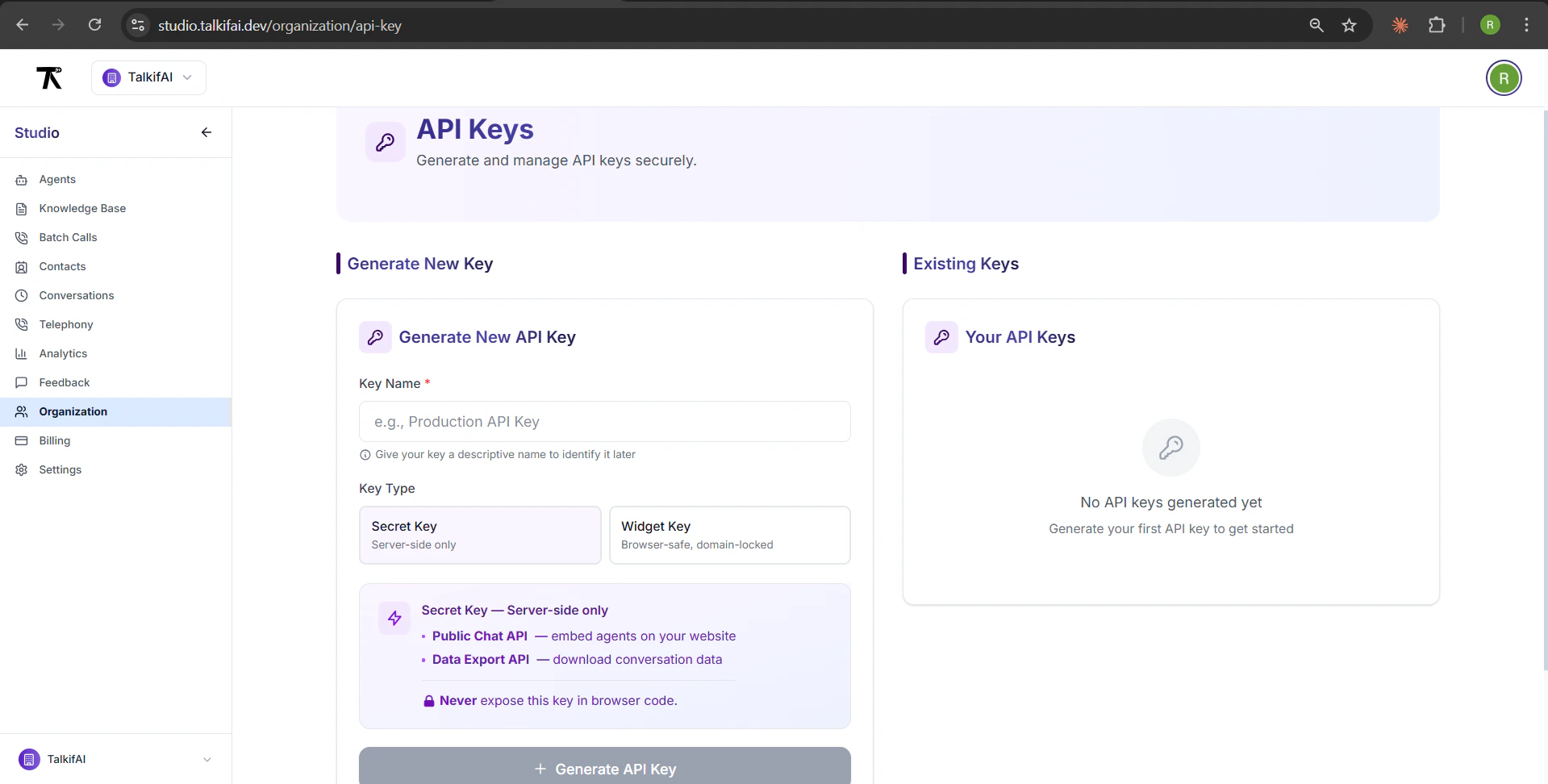
All API keys are managed in **Organization → API Keys**.
 ***
## Key Types
TalkifAI supports **two types** of API keys:
### 1. Secret Key (Server-Side Only)
**Use for:** Backend servers, serverless functions, secure environments
**Characteristics:**
* ❌ **Never** expose to browser/client-side code
* ✅ Full access to all APIs
* ✅ No domain restrictions
* ✅ 1-year expiry
**Example usage:**
```bash theme={null}
# Server-side environment variable
TALKIFAI_API_KEY=your_secret_key_here
# API request
curl -X POST "https://api.talkifai.dev/v1/chat/sessions" \
-H "X-API-Key: $TALKIFAI_API_KEY" \
-H "Content-Type: application/json" \
-d '{"agent_id": "your-agent-id"}'
```
***
### 2. Widget Key (Browser-Safe)
**Use for:** Website widgets, frontend applications, public embeds
**Characteristics:**
* ✅ Safe to include in client-side code
* ✅ Domain-locked (CORS restricted)
* ✅ `localhost` always allowed for development
* ✅ 1-year expiry
**Security Features:**
* Requests from unlisted domains are **automatically rejected**
* Subdomains are automatically covered (e.g., `mysite.com` also allows `staging.mysite.com`)
* Can be revoked without affecting other keys
**Example usage:**
```javascript theme={null}
// Frontend JavaScript (safe!)
window.__TALKIFAI__ = {
apiUrl: "https://api.talkifai.dev/v1/chat",
widgetKey: "tk_widget_your_key_here", // Safe for browser
agentId: "your-agent-id",
};
```
***
## Creating an API Key
### Step 1: Navigate to API Keys
**URL:** `/organization/api-key`
**Path:** **Organization → API Keys** (sidebar)
**Permissions:**
* **Owners:** Can create and manage keys
* **Admins:** Can view keys
* **Members:** Can view keys
***
### Step 2: Configure Key Details
#### 1. Enter Key Name (Required)
Give your key a descriptive name to identify it later:
* Max 50 characters
* Examples: "Production Server", "Website Widget", "Dev Testing"
#### 2. Select Key Type
**Secret Key:**
* For server-side use only
* No domain restrictions
* Full API access
**Widget Key:**
* For browser/frontend use
* Domain-locked (CORS restricted)
* Safe for public embeds
#### 3. Add Allowed Domains (Widget Keys Only)
For Widget Keys, specify allowed domains (comma-separated):
```
mysite.com, staging.mysite.com, app.mysite.com
```
**Domain Rules:**
* Subdomains are automatically covered (`mysite.com` includes `*.mysite.com`)
* `localhost` is always allowed for development
* Multiple domains: separate with commas
* Protocol (`https://`) is optional
**Tip:** Add your production domain, staging domain, and localhost for development.
***
### Step 3: Generate Key
Click **Generate API Key** button.
**Key is shown ONCE:**
* Copy immediately to clipboard
* Store in password manager or environment variables
* Cannot be retrieved later (only the prefix is stored)
**Security Warning:** API keys are shown only once at creation. You won't be able to see the full key again after leaving the page. If you lose it, you must generate a new key.
***
## Key Format
### Secret Key Format
```
64-character random string (no prefix)
Example: a8f3k2j9d1m4n7p0q5r8t2u6v3w9x1y...
```
**Characteristics:**
* No special prefix
* URL-safe characters only
* Unique per key
### Widget Key Format
```
tk_widget_XXXXXXXXXXXXXXXXXXXXXXXXXXXXXXXX
(32-character random string after prefix)
```
**Characteristics:**
* `tk_widget_` prefix identifies it as browser-safe
* Domain-locked via CORS
* Can be safely exposed in client-side code
***
## Key Details
After generation, key details are shown:
| Field | Description |
| ------------------- | -------------------------------------------- |
| **Key Name** | Your custom name (e.g., "Production Widget") |
| **Key Type** | Secret or Widget |
| **Created** | Creation date (e.g., "Jan 15, 2026") |
| **Expires** | Expiration date (1 year from creation) |
| **Allowed Domains** | Widget keys only: list of allowed domains |
| **Organization** | Organization ID the key is scoped to |
***
## Managing Existing Keys
### View Keys
**Location:** **Organization → API Keys** → "Your API Keys" section
**Displayed Information:**
* Key name
* Key type badge (Secret/Widget)
* Key prefix (first 8 characters + `••••••••`)
* Created date
* Expiration date
* Status (Active/Disabled)
* Allowed domains (Widget keys)
### Revoke a Key
**Steps:**
1. Find the key in "Your API Keys" section
2. Click **Revoke API Key** button
3. Confirm deletion
**Effects:**
* Key is immediately invalidated
* All active sessions using the key are terminated
* Cannot be undone
**Warning:** Revoking a key will break any applications using it. Update your applications with a new key before revoking.
***
## API Key Usage
### Chat API Endpoints
| Endpoint | Method | Auth | Description |
| --------------------------------- | ------ | --------------------- | -------------------- |
| `/v1/chat/sessions` | POST | API Key or Widget Key | Create chat session |
| `/v1/chat/sessions/{id}/messages` | POST | Session JWT | Send message (SSE) |
| `/v1/chat/sessions/{id}/messages` | GET | Session JWT | Get history |
| `/v1/chat/sessions/{id}/end` | POST | Session JWT | End session |
| `/v1/chat/voice-sessions` | POST | API Key or Widget Key | Create voice session |
### Authentication Methods
**Session Creation (Server-Side or Widget):**
```http theme={null}
POST /v1/chat/sessions
X-API-Key: tk_widget_your_key # or secret key
Content-Type: application/json
{
"agent_id": "your-agent-id"
}
```
**All Other Requests (Client-Side with JWT):**
```http theme={null}
POST /v1/chat/sessions/{id}/messages
Authorization: Bearer {session_token}
Content-Type: application/json
{
"message": "Hello"
}
```
***
## Security Best Practices
### 1. Use Widget Keys for Frontend
✅ **Correct:**
```javascript theme={null}
// Frontend widget config
window.__TALKIFAI__ = {
widgetKey: "tk_widget_..." // ✅ Safe for browser
};
```
❌ **Wrong:**
```javascript theme={null}
// Frontend widget config
window.__TALKIFAI__ = {
apiKey: "a8f3k2j9..." // ❌ Secret key exposed!
};
```
### 2. Store Secret Keys Securely
**Environment Variables:**
```bash theme={null}
# .env.local (never commit to git)
TALKIFAI_API_KEY=your_secret_key_here
```
**Server-Side Code:**
```javascript theme={null}
// Node.js/Express
app.post('/api/chat/start', async (req, res) => {
const response = await fetch('https://api.talkifai.dev/v1/chat/sessions', {
method: 'POST',
headers: {
'X-API-Key': process.env.TALKIFAI_API_KEY, // ✅ Server-side only
'Content-Type': 'application/json'
},
body: JSON.stringify({ agent_id: process.env.AGENT_ID })
});
const data = await response.json();
res.json(data); // Return session_token to frontend
});
```
### 3. Rotate Keys Periodically
**Recommended:** Rotate keys every 6-12 months
**Process:**
1. Generate new key
2. Update applications with new key
3. Test thoroughly
4. Revoke old key
### 4. Use Separate Keys per Environment
**Best Practice:**
* Production: `Production Widget`
* Staging: `Staging Widget`
* Development: `Dev Testing`
**Benefits:**
* Isolate issues to specific environment
* Revoke one environment without affecting others
* Track usage per environment
***
## Troubleshooting
### "Invalid API Key" Error
**Causes:**
* Key is incorrect or truncated
* Key was revoked
* Wrong key type (Secret vs Widget)
**Fix:**
1. Verify key is copied correctly (no extra spaces)
2. Check key status in **Organization → API Keys**
3. Generate new key if needed
### "CORS Origin Not Allowed" Error (Widget Keys)
**Causes:**
* Request from unlisted domain
* Domain format incorrect
**Fix:**
1. Add domain to allowed domains list
2. Include both root and www variants if needed:
* `mysite.com`
* `www.mysite.com`
3. Save and wait \~1 minute for propagation
### "Insufficient Credits" Error
**Causes:**
* Organization has no credits remaining
**Fix:**
1. Go to **Organization → Billing**
2. Add credits to your organization
3. Retry request
***
## Related Documentation
* [Chat API Reference](/api-reference/chat) — REST API for chat integration
* [Widget Integration Guide](/guides/widget-integration) — Embed widget on your website
* [Billing & Credits](/platform/billing) — Manage organization credits
***
## Next Steps
Create your first API key in Organization settings.
Use a Widget Key to embed chat on your website.
Integrate chat via REST API with custom UI.
Learn how to keep your keys secure.
***
## Key Types
TalkifAI supports **two types** of API keys:
### 1. Secret Key (Server-Side Only)
**Use for:** Backend servers, serverless functions, secure environments
**Characteristics:**
* ❌ **Never** expose to browser/client-side code
* ✅ Full access to all APIs
* ✅ No domain restrictions
* ✅ 1-year expiry
**Example usage:**
```bash theme={null}
# Server-side environment variable
TALKIFAI_API_KEY=your_secret_key_here
# API request
curl -X POST "https://api.talkifai.dev/v1/chat/sessions" \
-H "X-API-Key: $TALKIFAI_API_KEY" \
-H "Content-Type: application/json" \
-d '{"agent_id": "your-agent-id"}'
```
***
### 2. Widget Key (Browser-Safe)
**Use for:** Website widgets, frontend applications, public embeds
**Characteristics:**
* ✅ Safe to include in client-side code
* ✅ Domain-locked (CORS restricted)
* ✅ `localhost` always allowed for development
* ✅ 1-year expiry
**Security Features:**
* Requests from unlisted domains are **automatically rejected**
* Subdomains are automatically covered (e.g., `mysite.com` also allows `staging.mysite.com`)
* Can be revoked without affecting other keys
**Example usage:**
```javascript theme={null}
// Frontend JavaScript (safe!)
window.__TALKIFAI__ = {
apiUrl: "https://api.talkifai.dev/v1/chat",
widgetKey: "tk_widget_your_key_here", // Safe for browser
agentId: "your-agent-id",
};
```
***
## Creating an API Key
### Step 1: Navigate to API Keys
**URL:** `/organization/api-key`
**Path:** **Organization → API Keys** (sidebar)
**Permissions:**
* **Owners:** Can create and manage keys
* **Admins:** Can view keys
* **Members:** Can view keys
***
### Step 2: Configure Key Details
#### 1. Enter Key Name (Required)
Give your key a descriptive name to identify it later:
* Max 50 characters
* Examples: "Production Server", "Website Widget", "Dev Testing"
#### 2. Select Key Type
**Secret Key:**
* For server-side use only
* No domain restrictions
* Full API access
**Widget Key:**
* For browser/frontend use
* Domain-locked (CORS restricted)
* Safe for public embeds
#### 3. Add Allowed Domains (Widget Keys Only)
For Widget Keys, specify allowed domains (comma-separated):
```
mysite.com, staging.mysite.com, app.mysite.com
```
**Domain Rules:**
* Subdomains are automatically covered (`mysite.com` includes `*.mysite.com`)
* `localhost` is always allowed for development
* Multiple domains: separate with commas
* Protocol (`https://`) is optional
**Tip:** Add your production domain, staging domain, and localhost for development.
***
### Step 3: Generate Key
Click **Generate API Key** button.
**Key is shown ONCE:**
* Copy immediately to clipboard
* Store in password manager or environment variables
* Cannot be retrieved later (only the prefix is stored)
**Security Warning:** API keys are shown only once at creation. You won't be able to see the full key again after leaving the page. If you lose it, you must generate a new key.
***
## Key Format
### Secret Key Format
```
64-character random string (no prefix)
Example: a8f3k2j9d1m4n7p0q5r8t2u6v3w9x1y...
```
**Characteristics:**
* No special prefix
* URL-safe characters only
* Unique per key
### Widget Key Format
```
tk_widget_XXXXXXXXXXXXXXXXXXXXXXXXXXXXXXXX
(32-character random string after prefix)
```
**Characteristics:**
* `tk_widget_` prefix identifies it as browser-safe
* Domain-locked via CORS
* Can be safely exposed in client-side code
***
## Key Details
After generation, key details are shown:
| Field | Description |
| ------------------- | -------------------------------------------- |
| **Key Name** | Your custom name (e.g., "Production Widget") |
| **Key Type** | Secret or Widget |
| **Created** | Creation date (e.g., "Jan 15, 2026") |
| **Expires** | Expiration date (1 year from creation) |
| **Allowed Domains** | Widget keys only: list of allowed domains |
| **Organization** | Organization ID the key is scoped to |
***
## Managing Existing Keys
### View Keys
**Location:** **Organization → API Keys** → "Your API Keys" section
**Displayed Information:**
* Key name
* Key type badge (Secret/Widget)
* Key prefix (first 8 characters + `••••••••`)
* Created date
* Expiration date
* Status (Active/Disabled)
* Allowed domains (Widget keys)
### Revoke a Key
**Steps:**
1. Find the key in "Your API Keys" section
2. Click **Revoke API Key** button
3. Confirm deletion
**Effects:**
* Key is immediately invalidated
* All active sessions using the key are terminated
* Cannot be undone
**Warning:** Revoking a key will break any applications using it. Update your applications with a new key before revoking.
***
## API Key Usage
### Chat API Endpoints
| Endpoint | Method | Auth | Description |
| --------------------------------- | ------ | --------------------- | -------------------- |
| `/v1/chat/sessions` | POST | API Key or Widget Key | Create chat session |
| `/v1/chat/sessions/{id}/messages` | POST | Session JWT | Send message (SSE) |
| `/v1/chat/sessions/{id}/messages` | GET | Session JWT | Get history |
| `/v1/chat/sessions/{id}/end` | POST | Session JWT | End session |
| `/v1/chat/voice-sessions` | POST | API Key or Widget Key | Create voice session |
### Authentication Methods
**Session Creation (Server-Side or Widget):**
```http theme={null}
POST /v1/chat/sessions
X-API-Key: tk_widget_your_key # or secret key
Content-Type: application/json
{
"agent_id": "your-agent-id"
}
```
**All Other Requests (Client-Side with JWT):**
```http theme={null}
POST /v1/chat/sessions/{id}/messages
Authorization: Bearer {session_token}
Content-Type: application/json
{
"message": "Hello"
}
```
***
## Security Best Practices
### 1. Use Widget Keys for Frontend
✅ **Correct:**
```javascript theme={null}
// Frontend widget config
window.__TALKIFAI__ = {
widgetKey: "tk_widget_..." // ✅ Safe for browser
};
```
❌ **Wrong:**
```javascript theme={null}
// Frontend widget config
window.__TALKIFAI__ = {
apiKey: "a8f3k2j9..." // ❌ Secret key exposed!
};
```
### 2. Store Secret Keys Securely
**Environment Variables:**
```bash theme={null}
# .env.local (never commit to git)
TALKIFAI_API_KEY=your_secret_key_here
```
**Server-Side Code:**
```javascript theme={null}
// Node.js/Express
app.post('/api/chat/start', async (req, res) => {
const response = await fetch('https://api.talkifai.dev/v1/chat/sessions', {
method: 'POST',
headers: {
'X-API-Key': process.env.TALKIFAI_API_KEY, // ✅ Server-side only
'Content-Type': 'application/json'
},
body: JSON.stringify({ agent_id: process.env.AGENT_ID })
});
const data = await response.json();
res.json(data); // Return session_token to frontend
});
```
### 3. Rotate Keys Periodically
**Recommended:** Rotate keys every 6-12 months
**Process:**
1. Generate new key
2. Update applications with new key
3. Test thoroughly
4. Revoke old key
### 4. Use Separate Keys per Environment
**Best Practice:**
* Production: `Production Widget`
* Staging: `Staging Widget`
* Development: `Dev Testing`
**Benefits:**
* Isolate issues to specific environment
* Revoke one environment without affecting others
* Track usage per environment
***
## Troubleshooting
### "Invalid API Key" Error
**Causes:**
* Key is incorrect or truncated
* Key was revoked
* Wrong key type (Secret vs Widget)
**Fix:**
1. Verify key is copied correctly (no extra spaces)
2. Check key status in **Organization → API Keys**
3. Generate new key if needed
### "CORS Origin Not Allowed" Error (Widget Keys)
**Causes:**
* Request from unlisted domain
* Domain format incorrect
**Fix:**
1. Add domain to allowed domains list
2. Include both root and www variants if needed:
* `mysite.com`
* `www.mysite.com`
3. Save and wait \~1 minute for propagation
### "Insufficient Credits" Error
**Causes:**
* Organization has no credits remaining
**Fix:**
1. Go to **Organization → Billing**
2. Add credits to your organization
3. Retry request
***
## Related Documentation
* [Chat API Reference](/api-reference/chat) — REST API for chat integration
* [Widget Integration Guide](/guides/widget-integration) — Embed widget on your website
* [Billing & Credits](/platform/billing) — Manage organization credits
***
## Next Steps
Create your first API key in Organization settings.
Use a Widget Key to embed chat on your website.
Integrate chat via REST API with custom UI.
Learn how to keep your keys secure.